The short answer
Stand a metre and a half from a plain, evenly lit wall — not against it. Have somebody else hold the phone at your eye level and take the picture. Do not use the front camera at arm’s length. Then open the ID Photo Maker and pick your country and document. It puts four dots on your crown, your chin and each pupil by measuring the picture, and tells you which of the four it could not measure; drag any that landed wrong, then press Fit the box.
Everything below is why each of those sentences is in there, and what to do when the numbers still come out wrong.
What is actually being measured
Every passport photo standard in the world is a variation on one document: ICAO Doc 9303, which is what makes a passport machine-readable at a border. It constrains two things about the picture, and they are not the two things people expect.
- How much of the frame your head fills, measured from the bottom of the chin to the top of the head — the top of your hair, not your hairline. Usually 70 to 80 per cent of the photo’s height.
- Where your eyes sit, measured up from the bottom edge. Usually between half and three-fifths of the way up.
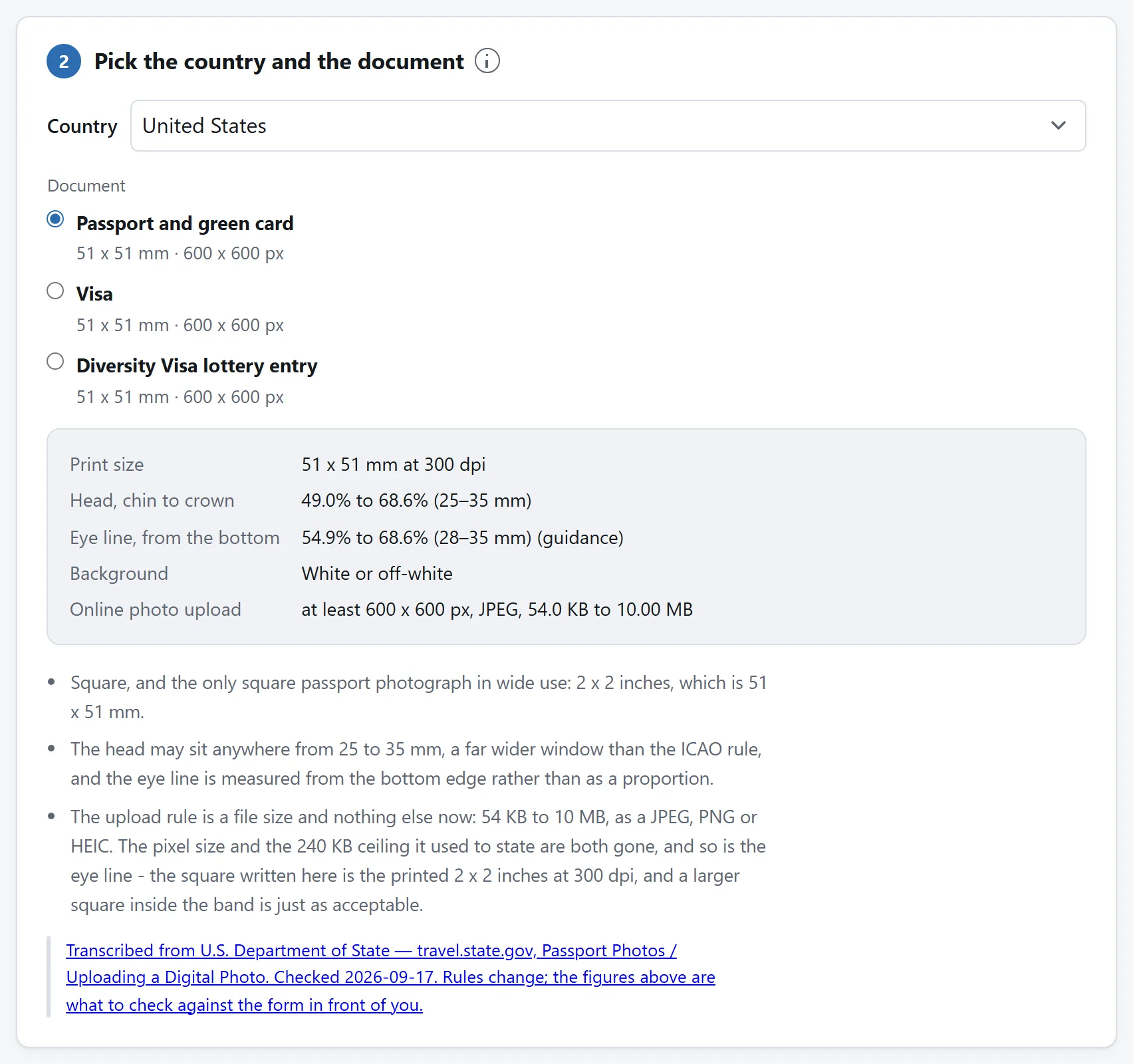
The size of the print — 35 × 45 mm across most of the world, 2 × 2 inches in the United States and India, 50 × 70 mm in Canada — is the easy part, and it is the part most tools get right and stop at. Getting the shape right and the head height wrong produces a photograph that looks completely fine and is refused.
The head height is the one everybody gets wrong
There are two reasons, and they pull in opposite directions.
The selfie problem. An arm is about sixty centimetres long. A lens that close both distorts the face — the nose grows, the ears shrink — and fills the frame with head, so the crop that contains your whole head has almost no room around it. Some countries will reject the distortion on its own. Getting somebody else to hold the phone a metre and a half away, and cropping in afterwards, fixes both at once.
The hairline problem. “Crown” means the very top of your head with your hair as it is. People move that dot down to their hairline, which makes the measured head shorter than the real one, which makes every crop come out with the head too small. If you have tall or voluminous hair, the crown is the top of it.
And the two bands are not the same everywhere, which is the part that catches people who have done this before. The UK asks for 29 to 34 mm of a 45 mm frame. Germany and the Schengen visa ask for 32 to 36 mm of the same frame. A photo cropped to the German rule is at the very top of the British one or over it, and a photo that passed for a Schengen visa can come back from Durham.
The background is what actually gets photos rejected
Almost nobody submits a photo with a bookcase in it. Enormous numbers of people submit one taken a foot from a white wall, with a soft grey shadow of their own head on it. “Plain white background” is not a statement about paint. It is a statement about shadows.
Three things fix nearly all of it:
- Stand away from the wall. A metre is plenty. A shadow needs somewhere to land, and at a metre it lands on the floor behind you rather than in the picture.
- Face the light. A window in front of you, not behind you and not to one side. Side light puts one half of the background darker than the other, which is a separate failure from the colour being wrong and has a different fix.
- Do not use a flash. It produces a hot spot behind your head and a hard shadow around it, which is the exact thing being checked for.
Note that light grey is the ICAO preference rather than white. It separates a fair face from the background and dark hair from it as well, and pure white does neither. Several countries say “white or off-white” and mean “plain and even”.
The things a human examiner is looking at
No tool can measure these, so they are worth a paragraph of their own. They are also, together, the second most common reason a photograph is returned.
- A neutral expression, mouth closed. A slight smile is refused by more countries than allow it.
- Both eyes open and clearly visible, with nothing across them — no hair, no heavy frames, no glare. Several countries no longer allow glasses at all.
- Looking straight at the camera, head level and square on. A head tilted more than a couple of degrees is noticed by an examiner and by almost nobody looking at their own photo.
- Nothing covering the face. Head coverings worn for religious reasons are allowed almost everywhere, provided the face from the bottom of the chin to the top of the forehead is clear.
- Plain clothing, not white. White against a white background leaves you looking like a floating head, and some offices refuse it for that reason.
Print size, DPI, and why a file can print at the wrong size
A digital picture has no physical size until something decides how many of its pixels go in an inch. That number lives in the file — and when a web browser writes a JPEG, it writes that field as “this is an aspect ratio, not a resolution”. So the file says nothing about how large it is, and whatever prints it guesses.
That is why a photo that is exactly the right number of pixels can still come out of a print shop the wrong size. 413 × 531 pixels is 35 × 45 mm, but only at 300 dpi, and only if the file says so. Any tool worth using writes that in; the ID Photo Maker rewrites those few bytes directly, without decoding the picture.
300 dpi is the floor almost every specification states. 600 is what a good photo lab will use, and costs nothing but file size.
The file-size rules that have a floor
Online forms are stricter than paper ones in a way that surprises people: several of them enforce a minimum file size as well as a maximum.
- Indian examination portals (SSC, UPSC and the rest): a photo at exactly 200 × 230 pixels, JPEG, 20 to 50 KB; and a signature at 140 × 60 pixels, 10 to 20 KB.
- The Chinese visa upload: 354 × 472 pixels, 40 to 120 KB.
- The UK passport upload: at least 600 × 750 pixels, and at least 50 KB.
The reason for the floor is sensible — a file under it is usually a thumbnail somebody uploaded by mistake — and the consequence is awkward. A 200 × 230 photograph is 46,000 pixels. At the best quality a browser will write, it can still land at 15 KB, and there is no way to make it larger by compressing it less, because there is no less.
The honest fix is padding: a JPEG can carry a comment segment, every decoder skips it, and adding one makes the file longer without changing a single pixel of the picture. That is what the tool does, and it writes an English sentence into the padding saying so. Beware of anything that reaches the floor by upscaling your photo instead — that is real quality thrown away to hit a number.
Printing them yourself, cheaply
A booth charges several pounds for six photographs. Any photo counter will print a 6 × 4 for pennies, and a 6 × 4 holds eight 35 × 45 mm photographs with room for the scissors.
Two things to get right when you send one:
- Print at 100 per cent. “Fit to page”, “scale to fit” and “borderless” all resize the sheet slightly, and a sheet resized by two per cent is eight photographs that are all the wrong size.
- Cut between the ticks, not along a line. Crop marks sit in the gaps rather than on the pictures, which is both easier to cut accurately and leaves no ink to trim off afterwards.
Why none of this needs an upload
Every step above is arithmetic on a picture your own machine has already decoded: a crop rectangle, a scale, a colour average, a JPEG encode, and a handful of bytes in a header. There is nothing in it that a server can do and a browser cannot.
Which is worth pausing on, because of what the file is. A passport photo is a picture of your face, and uploading one to a website tells that website your face, the country whose document you are applying for, and roughly when you applied. Photo tools that require an upload usually require an account too, and the combination is a database of exactly that. There is no technical reason for it to exist. See how to tell whether a tool really needs your files for the four checks that separate the ones that do from the ones that do not.