A black rectangle over a name and a name that has been deleted look identical on screen. One of them survives being selected and copied. This is the difference, the places a word hides that are not on the page at all, and the thirty-second check that tells you which of the two you have.
Open the PDF RedactorThe letters are deleted from the file, and the file is searched afterwards to prove it.
# How to redact a PDF so the text is really gone
A black rectangle over a name and a name that has been deleted look identical on screen. One of them survives being selected and copied. This is the difference, the places a word hides that are not on the page at all, and the thirty-second check that tells you which of the two you have.
[Open the PDF Redactor](https://abox.tools/redact-pdf/): The letters are deleted from the file, and the file is searched afterwards to prove it.
Last updated 26 August 2026
## The short answer
Open the [PDF Redactor](https://abox.tools/redact-pdf/), drop the document in, type the words that have to go, tick the ones you mean, and press “Take them out”. The letters are deleted from the page's own drawing instructions, the same words are taken out of the bookmarks, comments, form fields and document properties, and the finished file is opened again and searched in front of you before you are offered it.
Everything below is why that last clause is the important one, and how to tell whether the tool you already use can say the same.
## The failure this is about
Draw a black rectangle over a name in a PDF reader. What you see is a name with a black rectangle over it. What most readers *save* is a document containing the name and, separately, a rectangle with a position, a size and a colour.
A rectangle drawn that way is an **annotation**: an object that sits alongside the page rather than in it. The text underneath is exactly as it was. Select the area and press copy, or run any text extractor over the file, or open it in a program that draws annotations differently, and the name comes back. Nothing on screen distinguishes that from a real redaction, which is precisely why it keeps happening to organisations that employ lawyers.
It has published court filings, intelligence assessments, contracts, and — in December 2025 — blacked-out names in a mass release of United States Department of Justice documents, which were readable within hours of publication. The pattern is always the same. The rectangle was the annotation, and the annotation was never the text.
## What a real redaction does instead
A page in a PDF is a list of instructions: set this font, move the pen here, draw these glyphs. The words on the page exist in exactly one place, as the operands of those drawing instructions:
```
BT /F1 12 Tf 72 700 Td (Dear Mr Smith) Tj ET
```
Redacting the name means **deleting those letters from that instruction** and writing the page back out. After that there is nothing to recover, not because the file hides it well but because the letters are not in the file. There is no rectangle with something underneath it, because there is nothing underneath.
One thing has to be put back, or the result is visibly wrong. Text is drawn by advancing a pen across the page, so deleting five letters pulls the rest of the line five letters to the left: columns stop lining up and totals slide under the wrong headings. A tool doing this properly measures how far the removed letters would have advanced and puts that distance back as a spacing instruction, which moves the pen without drawing anything.
The black box, if there is one, is drawn *afterwards*, over a gap that is already empty. It is a courtesy to whoever reads the document — a sign that something was taken out — and not the redaction. That is the whole distinction in one sentence: in a real redaction, the box is decoration; in a fake one, the box *is* the redaction.
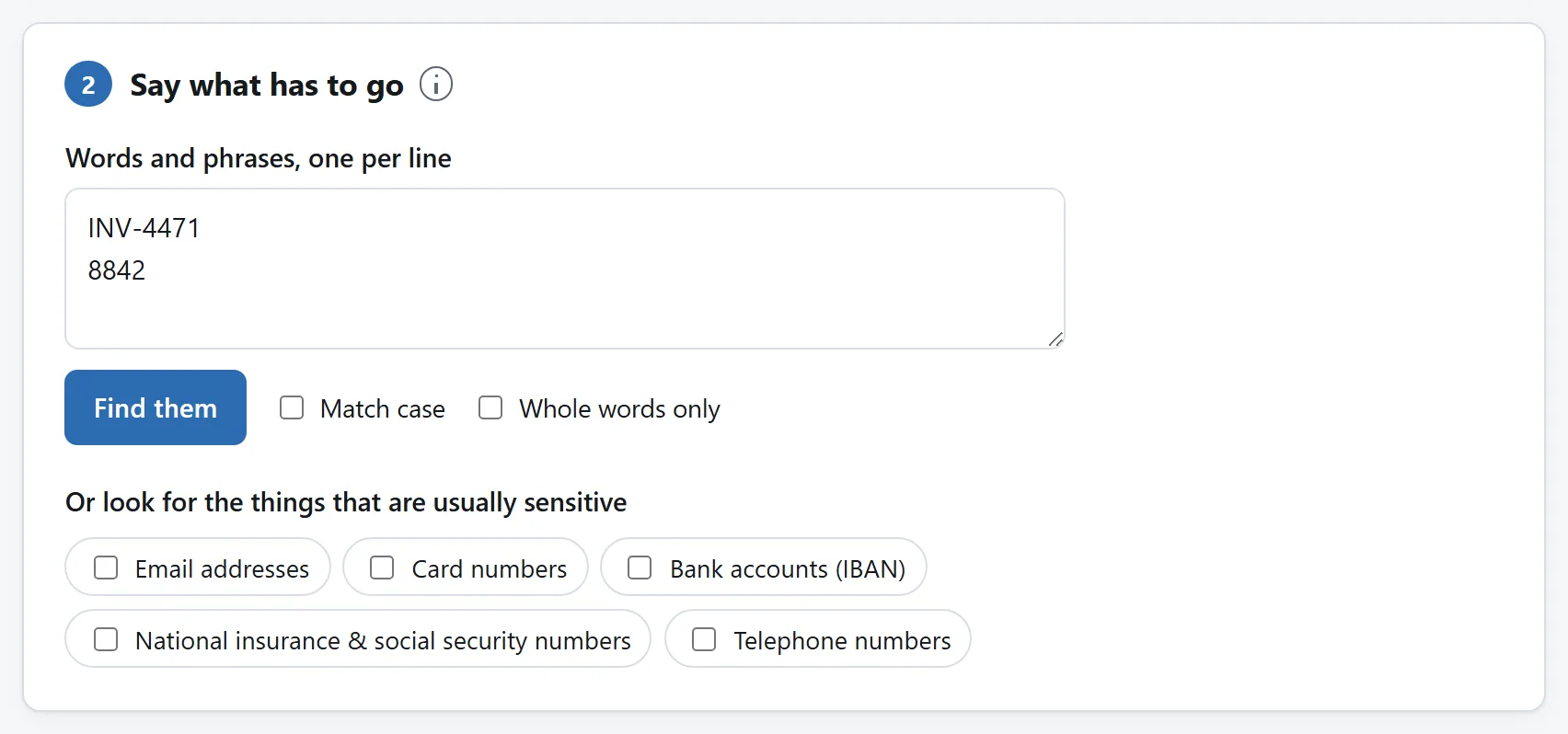
You say what has to go and the tool finds every instance, including the ones on page three that nobody remembered.
## The four places a word hides that are not the page
This is the part that catches people who did the first part properly. A PDF carries text in several places at once, and a reader will show, search or copy all of them. Removing a name from the page and leaving it in any of these has not removed it.
- **The document properties.** Title, author, and the name of the file this one was exported from. A document whose pages have had a name taken out and whose properties still read `Smith settlement draft 3.docx` is not redacted. There is usually a second copy of the same information in an XMP packet, which has to go too.
- **Bookmarks.** The outline down the side of a reader is a list of headings with page numbers attached — and a heading is a line of text that nothing on the page controls.
- **Form fields and comments.** What somebody typed into a form is stored twice: once as the field's value and once as the appearance the reader draws. Both have to go. A sticky note carries its text and the name of whoever wrote it.
- **The replacement text.** A PDF may declare that a run of glyphs “spells” something else, so that a ligature or a hyphenated line copies as the word it stands for. It means a document can show one thing and hand a reader another on Ctrl+C, and a redaction that removed only what was drawn would leave the sentence intact for anybody who selected the paragraph.
Attachments are the fifth. A PDF can carry entire other files inside it, and nothing you do to the pages touches them.
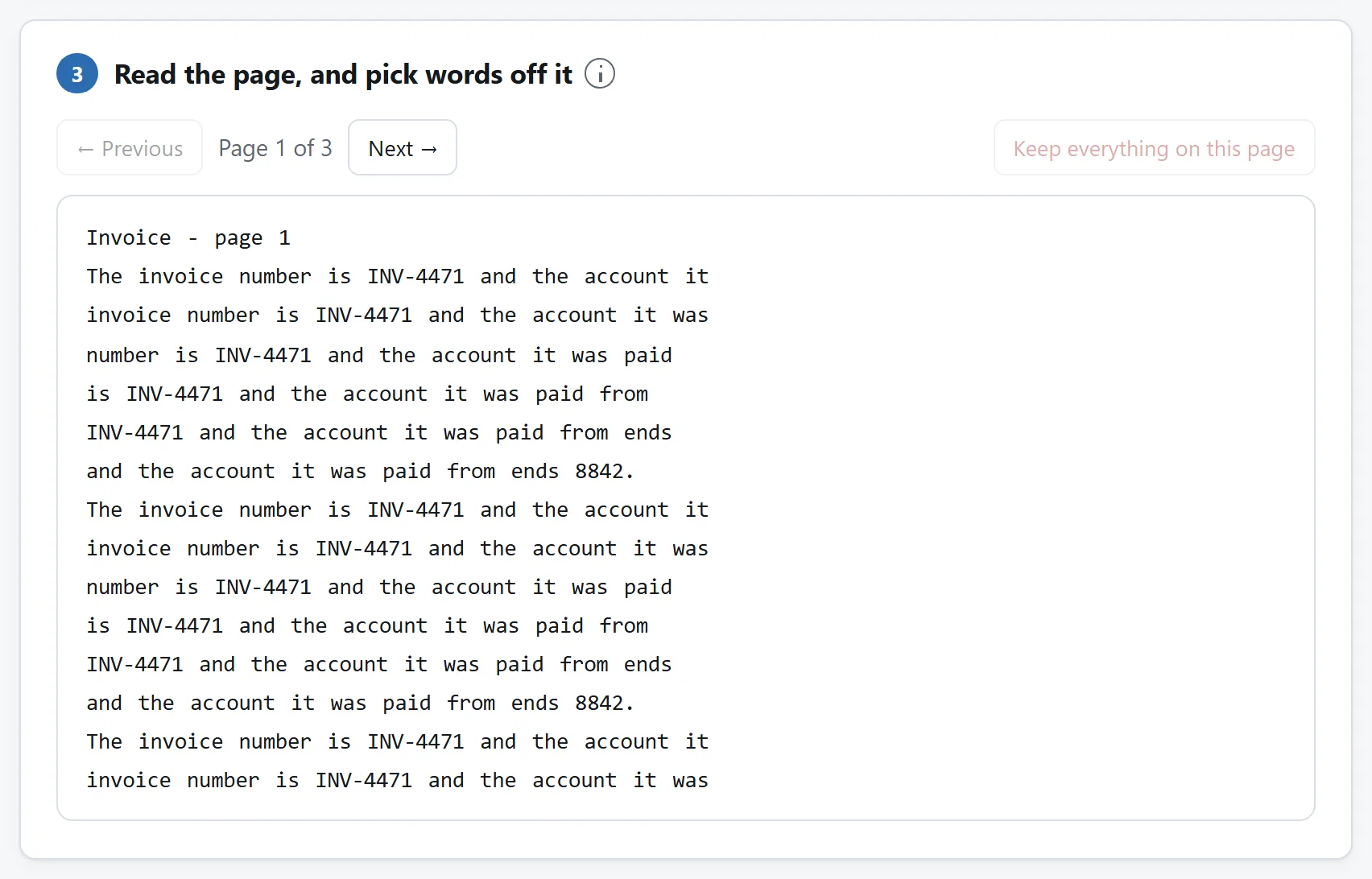
This is the part that surprises people. A PDF is not a picture: the words in it can be selected, searched and copied by anybody who receives it.
## How to check a file, in thirty seconds
Do this to anything you are about to send, whatever tool produced it. It is the check that would have caught every one of the published failures.
1. **Open the finished file and press Ctrl+F** (Cmd+F on a Mac). Search for the word you removed. A real redaction returns nothing. If the reader jumps to a black rectangle, the word is still in there and the rectangle is sitting on top of it.
2. **Select the blacked-out area and copy it.** Drag across the rectangle, press Ctrl+C, and paste into a text box. If anything arrives, you have found the same failure from the other direction.
3. **Select the whole document and copy that.** Ctrl+A then Ctrl+C, paste into any text editor, and read what comes out. This is the single most useful of the three, because it shows you the document as a text extractor sees it — including text you never knew was there, which on a scanned page is common.
4. **Look at the properties** — File → Properties in most readers — and at the bookmarks panel. Both are places a name survives a page-perfect redaction.
The [PDF Redactor](https://abox.tools/redact-pdf/) runs the first and third of those for you and shows the count, because a tool asserting that it removed something is not evidence and a search of the finished file is.
## Scanned documents are a different problem
A scan is a photograph of a page. The words on it are pixels, not text, and no amount of editing the text layer touches them — because there is no text layer, or because the one there is describes the picture rather than being it.
Most modern scanners and PDF tools add an invisible text layer over the picture, written by optical character recognition, so the page can be searched. That layer is real text and can be removed. Removing it is worth doing: it is what a search, a copy, and every automated system that reads documents would have found. It changes nothing about the picture, in which the words are still perfectly legible to anyone looking at the page.
So for a scan, the honest sequence is: take the words out of the text layer, then deal with the picture separately — which means overwriting pixels. That is what the [image redactor](https://abox.tools/guides/redact-an-image/) does, and the guide beside it explains why a blur or a mosaic is not good enough for text.
## Why not just print it and re-scan it
Because it works, and it costs you everything else. Printing a redacted page and scanning it back in does produce a document with no text layer to leak — and a document nobody can search, no screen reader can read, that is five to fifty times the size, and whose quality is whatever the office scanner felt like. It also rests on the page having printed the way it looked: an annotation can be marked as showing on screen and not on paper, and when that is what your black box was, the sheet that comes out of the printer has the name on it.
The same argument applies to “flatten to an image”, which some tools offer as a redaction. It converts every page into a photograph of itself. If the words were covered rather than deleted, the covering is now permanent — but everything else about the document is gone with it, and the file you send is one nobody can work with.
## Why this is the job least worth uploading
A redaction service has to be given the unredacted file. That is the whole transaction: the private version arrives first, intact, and is the version on somebody else's disk. Whatever the privacy policy says, the sequence is not arguable — the document you were careful about is the one you handed over.
What people redact makes this worse than it sounds. Witness statements, medical letters, bank statements going to a landlord, a contract with one client's name in it going to another, a filing with a home address on it. Those are the documents, which is exactly why the tool for them should not have a server on the other end.
Everything on [this site's redactor](https://abox.tools/redact-pdf/) happens in your own browser: the file is read, edited, written and checked on your machine, and the words you search for never leave the tab either. Unplug from the internet and it keeps working, which is the simplest proof there is that nothing is being sent anywhere. See [is it safe to upload files](https://abox.tools/guides/is-it-safe-to-upload-files/) for what an upload actually involves.
The short answer
Open the PDF Redactor, drop the document in, type the words that have to go, tick the ones you mean, and press “Take them out”. The letters are deleted from the page's own drawing instructions, the same words are taken out of the bookmarks, comments, form fields and document properties, and the finished file is opened again and searched in front of you before you are offered it.
Everything below is why that last clause is the important one, and how to tell whether the tool you already use can say the same.
The failure this is about
Draw a black rectangle over a name in a PDF reader. What you see is a name with a black rectangle over it. What most readers save is a document containing the name and, separately, a rectangle with a position, a size and a colour.
A rectangle drawn that way is an annotation: an object that sits alongside the page rather than in it. The text underneath is exactly as it was. Select the area and press copy, or run any text extractor over the file, or open it in a program that draws annotations differently, and the name comes back. Nothing on screen distinguishes that from a real redaction, which is precisely why it keeps happening to organisations that employ lawyers.
It has published court filings, intelligence assessments, contracts, and — in December 2025 — blacked-out names in a mass release of United States Department of Justice documents, which were readable within hours of publication. The pattern is always the same. The rectangle was the annotation, and the annotation was never the text.
What a real redaction does instead
A page in a PDF is a list of instructions: set this font, move the pen here, draw these glyphs. The words on the page exist in exactly one place, as the operands of those drawing instructions:
BT /F1 12 Tf 72 700 Td (Dear Mr Smith) Tj ET
Redacting the name means deleting those letters from that instruction and writing the page back out. After that there is nothing to recover, not because the file hides it well but because the letters are not in the file. There is no rectangle with something underneath it, because there is nothing underneath.
One thing has to be put back, or the result is visibly wrong. Text is drawn by advancing a pen across the page, so deleting five letters pulls the rest of the line five letters to the left: columns stop lining up and totals slide under the wrong headings. A tool doing this properly measures how far the removed letters would have advanced and puts that distance back as a spacing instruction, which moves the pen without drawing anything.
The black box, if there is one, is drawn afterwards, over a gap that is already empty. It is a courtesy to whoever reads the document — a sign that something was taken out — and not the redaction. That is the whole distinction in one sentence: in a real redaction, the box is decoration; in a fake one, the box is the redaction.
You say what has to go and the tool finds every instance, including the ones on page three that nobody remembered.
The four places a word hides that are not the page
This is the part that catches people who did the first part properly. A PDF carries text in several places at once, and a reader will show, search or copy all of them. Removing a name from the page and leaving it in any of these has not removed it.
The document properties. Title, author, and the name of the file this one was exported from. A document whose pages have had a name taken out and whose properties still read Smith settlement draft 3.docx is not redacted. There is usually a second copy of the same information in an XMP packet, which has to go too.
Bookmarks. The outline down the side of a reader is a list of headings with page numbers attached — and a heading is a line of text that nothing on the page controls.
Form fields and comments. What somebody typed into a form is stored twice: once as the field's value and once as the appearance the reader draws. Both have to go. A sticky note carries its text and the name of whoever wrote it.
The replacement text. A PDF may declare that a run of glyphs “spells” something else, so that a ligature or a hyphenated line copies as the word it stands for. It means a document can show one thing and hand a reader another on Ctrl+C, and a redaction that removed only what was drawn would leave the sentence intact for anybody who selected the paragraph.
Attachments are the fifth. A PDF can carry entire other files inside it, and nothing you do to the pages touches them.
This is the part that surprises people. A PDF is not a picture: the words in it can be selected, searched and copied by anybody who receives it.
How to check a file, in thirty seconds
Do this to anything you are about to send, whatever tool produced it. It is the check that would have caught every one of the published failures.
Open the finished file and press Ctrl+F (Cmd+F on a Mac). Search for the word you removed. A real redaction returns nothing. If the reader jumps to a black rectangle, the word is still in there and the rectangle is sitting on top of it.
Select the blacked-out area and copy it. Drag across the rectangle, press Ctrl+C, and paste into a text box. If anything arrives, you have found the same failure from the other direction.
Select the whole document and copy that. Ctrl+A then Ctrl+C, paste into any text editor, and read what comes out. This is the single most useful of the three, because it shows you the document as a text extractor sees it — including text you never knew was there, which on a scanned page is common.
Look at the properties — File → Properties in most readers — and at the bookmarks panel. Both are places a name survives a page-perfect redaction.
The PDF Redactor runs the first and third of those for you and shows the count, because a tool asserting that it removed something is not evidence and a search of the finished file is.
Scanned documents are a different problem
A scan is a photograph of a page. The words on it are pixels, not text, and no amount of editing the text layer touches them — because there is no text layer, or because the one there is describes the picture rather than being it.
Most modern scanners and PDF tools add an invisible text layer over the picture, written by optical character recognition, so the page can be searched. That layer is real text and can be removed. Removing it is worth doing: it is what a search, a copy, and every automated system that reads documents would have found. It changes nothing about the picture, in which the words are still perfectly legible to anyone looking at the page.
So for a scan, the honest sequence is: take the words out of the text layer, then deal with the picture separately — which means overwriting pixels. That is what the image redactor does, and the guide beside it explains why a blur or a mosaic is not good enough for text.
Why not just print it and re-scan it
Because it works, and it costs you everything else. Printing a redacted page and scanning it back in does produce a document with no text layer to leak — and a document nobody can search, no screen reader can read, that is five to fifty times the size, and whose quality is whatever the office scanner felt like. It also rests on the page having printed the way it looked: an annotation can be marked as showing on screen and not on paper, and when that is what your black box was, the sheet that comes out of the printer has the name on it.
The same argument applies to “flatten to an image”, which some tools offer as a redaction. It converts every page into a photograph of itself. If the words were covered rather than deleted, the covering is now permanent — but everything else about the document is gone with it, and the file you send is one nobody can work with.
Why this is the job least worth uploading
A redaction service has to be given the unredacted file. That is the whole transaction: the private version arrives first, intact, and is the version on somebody else's disk. Whatever the privacy policy says, the sequence is not arguable — the document you were careful about is the one you handed over.
What people redact makes this worse than it sounds. Witness statements, medical letters, bank statements going to a landlord, a contract with one client's name in it going to another, a filing with a home address on it. Those are the documents, which is exactly why the tool for them should not have a server on the other end.
Everything on this site's redactor happens in your own browser: the file is read, edited, written and checked on your machine, and the words you search for never leave the tab either. Unplug from the internet and it keeps working, which is the simplest proof there is that nothing is being sent anywhere. See is it safe to upload files for what an upload actually involves.

