Cropping changes the shape of the picture, which means writing new frames — there is no way round that, and any tool claiming otherwise is doing something else. This is what it costs, and how to spend it well.
# How to crop a video to a different shape
Cropping changes the shape of the picture, which means writing new frames — there is no way round that, and any tool claiming otherwise is doing something else. This is what it costs, and how to spend it well.
[Open the Video Cropper](https://abox.tools/crop-video/): Cut a clip down to the part that matters.
Last updated 26 August 2026
## The short answer
Open the [Video Cropper](https://abox.tools/crop-video/), drop the clip in, drag the box over the part you want to keep — or lock it to a shape if you have been given one — and export. The clip that comes out is exactly as long as the one that went in, with its timing and its sound intact.
Unlike trimming, this one has to write new frames. That is not a shortcoming of any particular tool; it is what cropping is. The rest of this page is about what that costs and how to keep it small.
## Why cropping cannot avoid a re-encode
A trim keeps whole frames, so a good trimmer moves them across untouched and nothing is decoded at all. A crop keeps part of each frame — and part of a frame is a different picture. There is no way to store a different picture without writing the pixels out afresh.
There is a narrow exception, and it is worth knowing so you can recognise when somebody is claiming it. Video is encoded in blocks, and if a crop landed exactly on block boundaries on all four sides, some of the data could in principle be reused. In practice the frame's own dimensions, motion vectors and prediction all have to be rewritten anyway, so nothing real is built this way. Assume a crop means a re-encode.
What a well-behaved cropper will do is not spend *more* than the original did on the same area. Encoding a cropped region at a higher bitrate than its source only makes the file bigger; it cannot put back detail the original did not have.
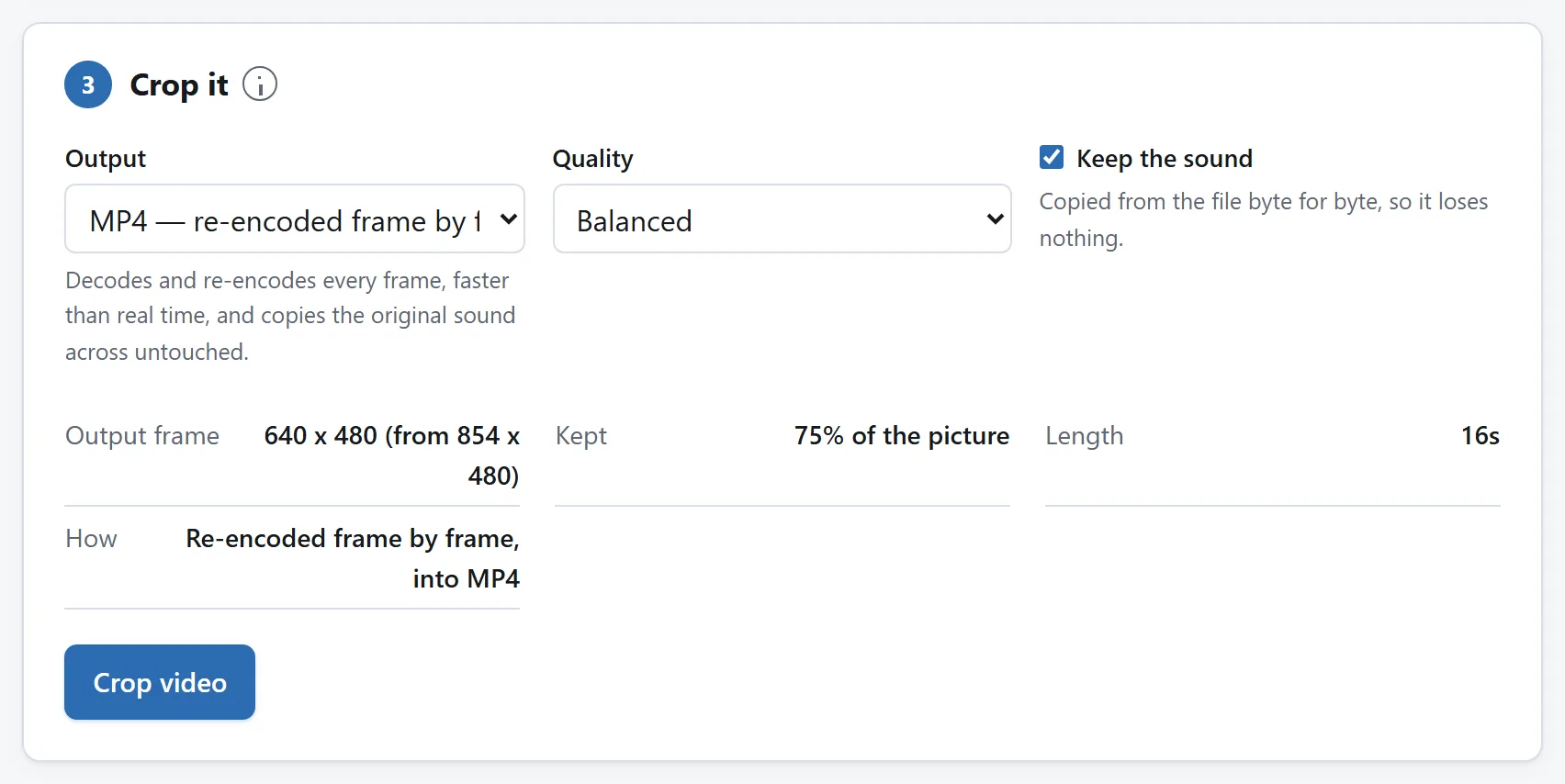
Because the picture has to be re-encoded, this card exists at all. The summary is the tool saying what that will cost before it does it.
## The shapes you are actually being asked for
Most cropping is done because somewhere has a required aspect ratio. The short list:
- **9:16 — tall.** Stories, reels, shorts, TikTok. Full screen on a phone held normally. The most common reason anybody crops a video at all.
- **1:1 — square.** Feed posts on several platforms. Works whichever way the viewer is holding their phone, which is why it persists.
- **4:5 — slightly tall.** The largest shape some feeds allow, so it takes more of the screen than a square without being a full vertical video.
- **16:9 — wide.** The standard for video generally. You are usually cropping *to* this only to remove black bars, or *from* it to get one of the above.
Lock the box to the ratio rather than dragging by eye. Being a few pixels out means the platform crops your crop, and it will not consult you about where.
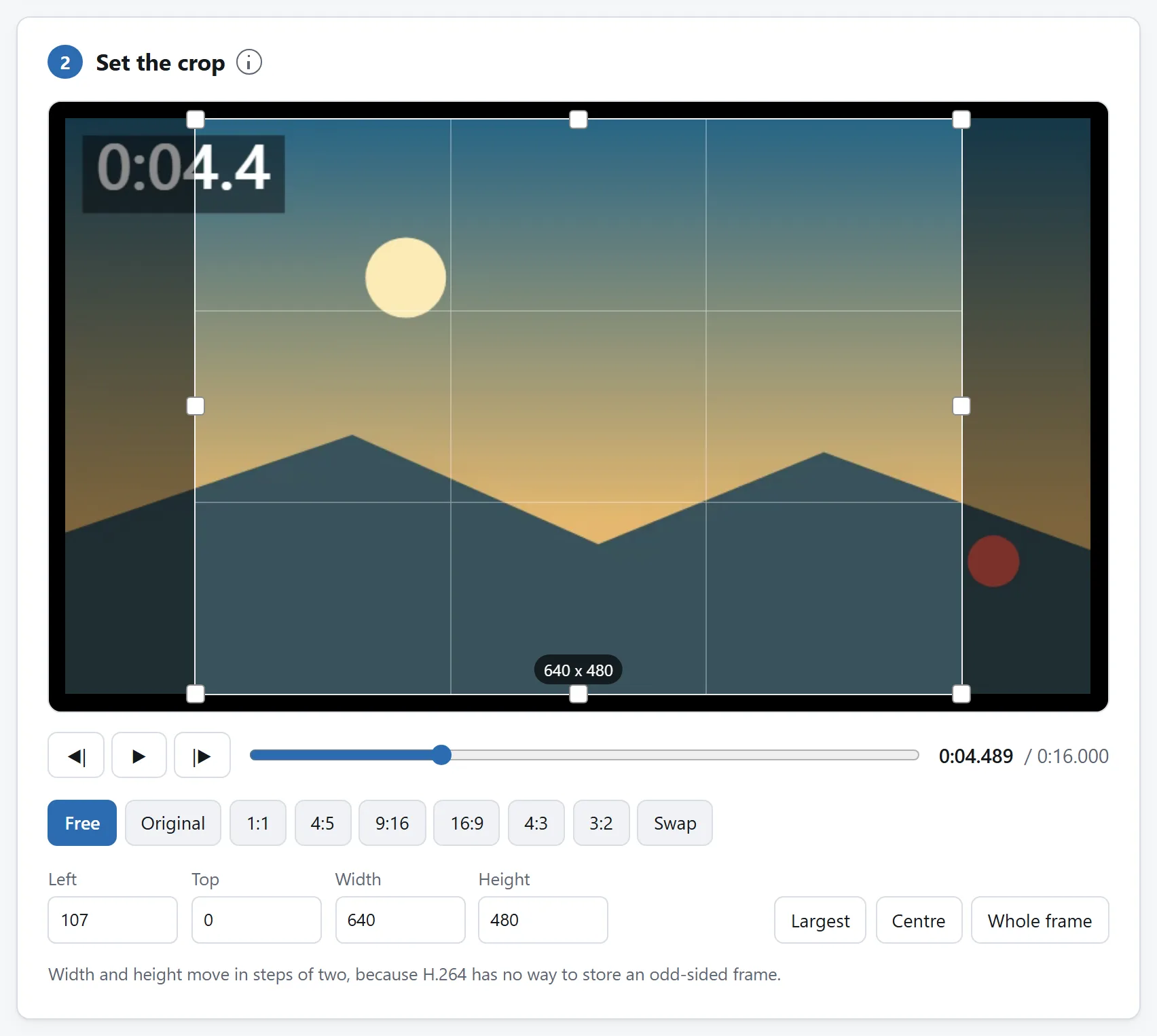
The box is dragged or typed, and the numbers say exactly what will be kept. A square out of a widescreen clip is the commonest request.
## Turning a landscape clip vertical
This is the hardest common case, and it is worth being clear that cropping is a compromise rather than a solution.
A 16:9 video cropped to 9:16 keeps about 32% of the picture width. Whatever is at the sides is gone — and in a landscape shot, the sides are usually where the context is. If two people are talking on opposite sides of the frame, no single crop keeps both.
Choose the crop by watching the clip once and asking where the subject actually is for most of it. If the answer is “it moves”, a static crop is the wrong tool and what you want is an editor that can pan the crop over time. If the answer is “centre, mostly”, a centred crop is fine and takes ten seconds.
The alternative worth remembering: many platforms accept a landscape video and letterbox it themselves. Cropping is for when you want the full screen, not for when you want the video to be accepted.
## Why the width and height move in steps of two
If you notice the crop box refusing odd numbers, that is the codec rather than the interface being difficult.
H.264 — the codec inside an MP4 — stores colour at half resolution horizontally and vertically, because the eye is much less sensitive to colour detail than to brightness. That means the picture is handled in two-pixel units and there is no way to describe a frame with an odd number of pixels on a side.
Tools deal with this by rounding your crop after you set it, which moves your box by a pixel without telling you, or by only ever offering even numbers in the first place. The second is what happens here.
## What happens to the sound
Nothing, on the MP4 path. Cropping changes the picture and has no reason to touch the audio, so the audio is copied across sample by sample without ever being decoded — byte for byte what was in the file.
On the recording fallback, described below, the sound is captured from playback and encoded again, which costs a little quality. Either way there is a checkbox to leave it out entirely, which is worth using when the clip is going somewhere that plays muted anyway and you want the smallest file.
## Formats, and how long it takes
**MP4, M4V and MOV** are read directly, whatever is inside them — H.264, HEVC, AV1 or VP9 — as long as your browser can decode that codec. Unlike trimming, cropping does have to decode, so the codec matters here in a way it does not there.
**Anything else your browser can play**, WebM most obviously, is cropped by playing it and recording the result, which works and takes as long as the clip is long.
**AVI, WMV, FLV and most MKVs** the browser can neither read nor play, and the tool refuses them with a message rather than failing halfway through.
Expect a crop to take real time on a long clip, because every frame is being decoded and re-encoded. There is no limit built into the tool, and the file is walked through a few megabytes at a time rather than loaded whole; the practical ceiling is the finished video, which is assembled in memory before you download it.
## Crop before you do anything else
If a clip needs both trimming and cropping, trim first — it is free, and every second you cut is a second nobody has to re-encode. Then crop the shorter clip once.
Doing it the other way round means cropping footage you are about to throw away, which costs time and quality for nothing. The [Video Trimmer](https://abox.tools/trim-video/) is next door, and [its guide](https://abox.tools/guides/trim-a-video/) explains why that step need not cost you anything at all.
More generally: every lossy step compounds. One crop of an original is one generation. A crop of a trim of an export of a download is four, and it looks like it.
## Why this does not need an upload
Decoding and re-encoding video in a browser is recent and it is real: WebCodecs exposes the same hardware encoder your phone uses to record video, and it is fast for the same reason. The work happens on the machine that already has the file, which for a multi-gigabyte video is also the only arrangement that makes sense — uploading it and downloading the result costs more time than the encoding does.
The tool here has no network feature of any kind, and the page's `Content-Security-Policy` names every address it may contact, none of which belongs to this site. Unplug from the internet and crop a clip anyway if you would rather check than be told.
[Is it safe to upload files to online converters?](https://abox.tools/guides/is-it-safe-to-upload-files/) sets out three more checks you can run on any tool.
The short answer
Open the Video Cropper, drop the clip in, drag the box over the part you want to keep — or lock it to a shape if you have been given one — and export. The clip that comes out is exactly as long as the one that went in, with its timing and its sound intact.
Unlike trimming, this one has to write new frames. That is not a shortcoming of any particular tool; it is what cropping is. The rest of this page is about what that costs and how to keep it small.
Why cropping cannot avoid a re-encode
A trim keeps whole frames, so a good trimmer moves them across untouched and nothing is decoded at all. A crop keeps part of each frame — and part of a frame is a different picture. There is no way to store a different picture without writing the pixels out afresh.
There is a narrow exception, and it is worth knowing so you can recognise when somebody is claiming it. Video is encoded in blocks, and if a crop landed exactly on block boundaries on all four sides, some of the data could in principle be reused. In practice the frame's own dimensions, motion vectors and prediction all have to be rewritten anyway, so nothing real is built this way. Assume a crop means a re-encode.
What a well-behaved cropper will do is not spend more than the original did on the same area. Encoding a cropped region at a higher bitrate than its source only makes the file bigger; it cannot put back detail the original did not have.
Because the picture has to be re-encoded, this card exists at all. The summary is the tool saying what that will cost before it does it.
The shapes you are actually being asked for
Most cropping is done because somewhere has a required aspect ratio. The short list:
9:16 — tall. Stories, reels, shorts, TikTok. Full screen on a phone held normally. The most common reason anybody crops a video at all.
1:1 — square. Feed posts on several platforms. Works whichever way the viewer is holding their phone, which is why it persists.
4:5 — slightly tall. The largest shape some feeds allow, so it takes more of the screen than a square without being a full vertical video.
16:9 — wide. The standard for video generally. You are usually cropping to this only to remove black bars, or from it to get one of the above.
Lock the box to the ratio rather than dragging by eye. Being a few pixels out means the platform crops your crop, and it will not consult you about where.
The box is dragged or typed, and the numbers say exactly what will be kept. A square out of a widescreen clip is the commonest request.
Turning a landscape clip vertical
This is the hardest common case, and it is worth being clear that cropping is a compromise rather than a solution.
A 16:9 video cropped to 9:16 keeps about 32% of the picture width. Whatever is at the sides is gone — and in a landscape shot, the sides are usually where the context is. If two people are talking on opposite sides of the frame, no single crop keeps both.
Choose the crop by watching the clip once and asking where the subject actually is for most of it. If the answer is “it moves”, a static crop is the wrong tool and what you want is an editor that can pan the crop over time. If the answer is “centre, mostly”, a centred crop is fine and takes ten seconds.
The alternative worth remembering: many platforms accept a landscape video and letterbox it themselves. Cropping is for when you want the full screen, not for when you want the video to be accepted.
Why the width and height move in steps of two
If you notice the crop box refusing odd numbers, that is the codec rather than the interface being difficult.
H.264 — the codec inside an MP4 — stores colour at half resolution horizontally and vertically, because the eye is much less sensitive to colour detail than to brightness. That means the picture is handled in two-pixel units and there is no way to describe a frame with an odd number of pixels on a side.
Tools deal with this by rounding your crop after you set it, which moves your box by a pixel without telling you, or by only ever offering even numbers in the first place. The second is what happens here.
What happens to the sound
Nothing, on the MP4 path. Cropping changes the picture and has no reason to touch the audio, so the audio is copied across sample by sample without ever being decoded — byte for byte what was in the file.
On the recording fallback, described below, the sound is captured from playback and encoded again, which costs a little quality. Either way there is a checkbox to leave it out entirely, which is worth using when the clip is going somewhere that plays muted anyway and you want the smallest file.
Formats, and how long it takes
MP4, M4V and MOV are read directly, whatever is inside them — H.264, HEVC, AV1 or VP9 — as long as your browser can decode that codec. Unlike trimming, cropping does have to decode, so the codec matters here in a way it does not there.
Anything else your browser can play, WebM most obviously, is cropped by playing it and recording the result, which works and takes as long as the clip is long.
AVI, WMV, FLV and most MKVs the browser can neither read nor play, and the tool refuses them with a message rather than failing halfway through.
Expect a crop to take real time on a long clip, because every frame is being decoded and re-encoded. There is no limit built into the tool, and the file is walked through a few megabytes at a time rather than loaded whole; the practical ceiling is the finished video, which is assembled in memory before you download it.
Crop before you do anything else
If a clip needs both trimming and cropping, trim first — it is free, and every second you cut is a second nobody has to re-encode. Then crop the shorter clip once.
Doing it the other way round means cropping footage you are about to throw away, which costs time and quality for nothing. The Video Trimmer is next door, and its guide explains why that step need not cost you anything at all.
More generally: every lossy step compounds. One crop of an original is one generation. A crop of a trim of an export of a download is four, and it looks like it.
Why this does not need an upload
Decoding and re-encoding video in a browser is recent and it is real: WebCodecs exposes the same hardware encoder your phone uses to record video, and it is fast for the same reason. The work happens on the machine that already has the file, which for a multi-gigabyte video is also the only arrangement that makes sense — uploading it and downloading the result costs more time than the encoding does.
The tool here has no network feature of any kind, and the page's Content-Security-Policy names every address it may contact, none of which belongs to this site. Unplug from the internet and crop a clip anyway if you would rather check than be told.

