A boomerang is a clip that plays forwards, then backwards, and loops. No tool here has a boomerang button; it falls out of three that do their one job each — cut, reverse, join — and the whole chain runs on your own machine.
# How to make a boomerang video
A boomerang is a clip that plays forwards, then backwards, and loops. No tool here has a boomerang button; it falls out of three that do their one job each — cut, reverse, join — and the whole chain runs on your own machine.
Last updated 26 August 2026
## The short answer
1. **Cut the moment.** Open the [Video Cutter](https://abox.tools/trim-video/), mark the second or two that should swing back and forth, and export it as its own clip.
2. **Reverse a copy.** Drop that clip into the [Video Reverser](https://abox.tools/reverse-video/), leave the sound out, and export. Now you have the same moment twice, once each way.
3. **Join the two.** Back in the Video Cutter, drop both files in, mark each whole, put the forward one first, and export one file.
None of the hops needs a download in between: after every export, a row under the download button offers to carry the result straight into the next tool — the reverser after the first cut, the cutter again after the reversal — and the file arrives there already loaded.
That file is the boomerang. Post it as it is anywhere that loops muted video, or take it through the [Video to GIF](https://abox.tools/video-to-gif/) converter if the destination only animates GIFs. Every step happens in your browser; nothing in this chain is uploaded, at any point, to anyone.
## Why cut first
Reversing has to decode and re-encode every frame it touches — the [reversing guide](https://abox.tools/guides/reverse-a-video/) explains why there is no cheaper way. Cutting, by contrast, is close to free: the cutter moves whole frames across without re-encoding them.
So the order is the whole trick. Reverse a two-second clip and the expensive step works on two seconds; reverse the original and it works on all of it, most of which you are about to throw away. On a phone recording of any length, cutting first is the difference between a boomerang in under a minute and a progress bar you sit behind.
Cut tight. A boomerang reads best when it swings across a single motion — a jump, a splash, a turn — and every frame you keep is paid for twice, once in each direction.
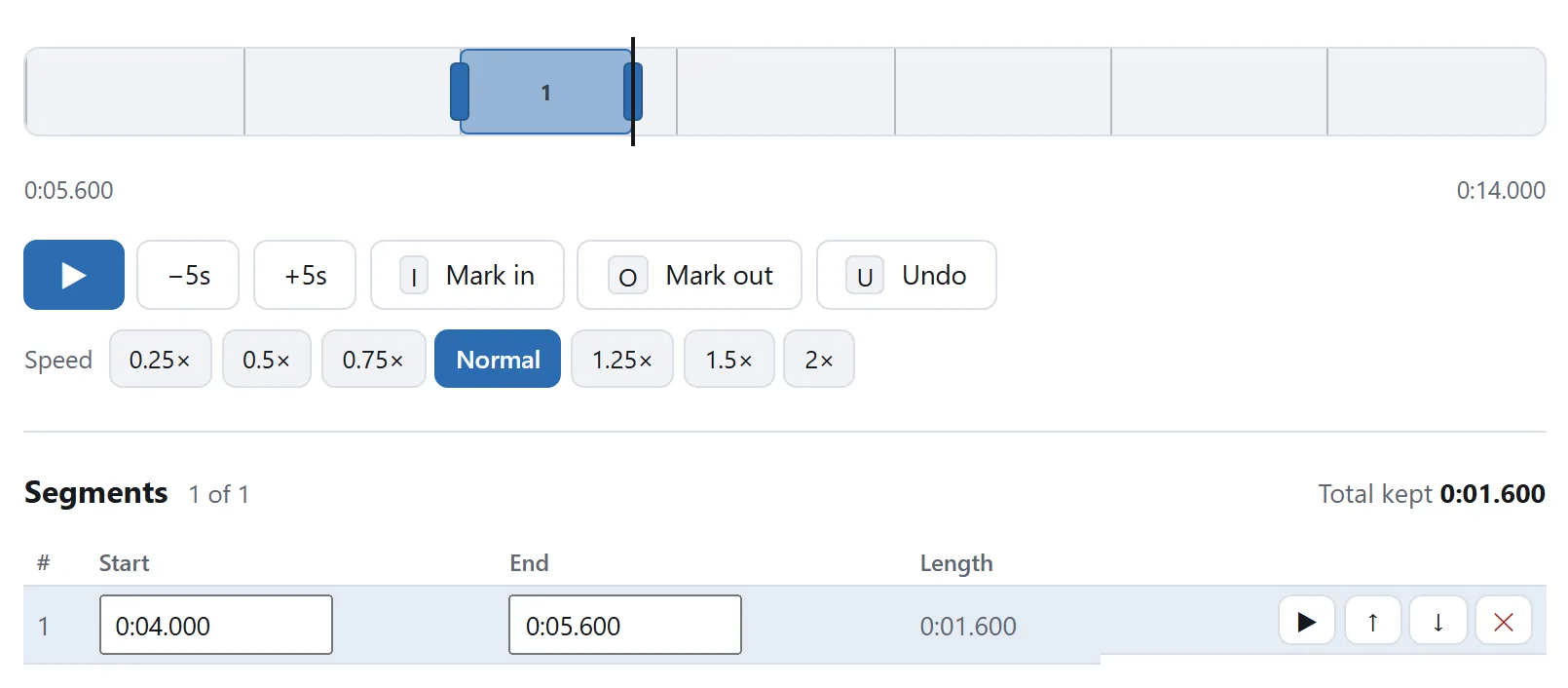
A second or two is all a boomerang is. Cutting first is what keeps the reverse cheap, and the table is where the length is decided.
## What to do with the sound
Leave it out, and do it at the reversing step — the reverser has a checkbox for exactly this. A boomerang's audio would play forwards, then backwards; reversed sound is unmistakably strange, and almost every place a boomerang ends up plays it muted anyway. Dropping the sound also makes the reverse quicker and both files smaller.
If you do keep it, the cutter will still join the two clips — but the seam that the eye forgives, the ear will not.
## Joining, and what the cutter will tell you
The two files being joined are close relatives — one was made from the other — but they have been through different encoders, so they may not agree byte-for-byte about their format. The cutter checks. Where the two agree it copies the frames straight across; where they do not it re-encodes, once, and says so on the export panel rather than leaving you to guess.
Order the parts before exporting: forward first, reversed second. A boomerang that starts on the backswing reads as a mistake.
One refinement worth the extra ten seconds: trim one frame off the start of the reversed clip before joining. The last frame of the forward clip and the first frame of the reversed one are the same picture, and showing it twice makes the turn hang for an instant.
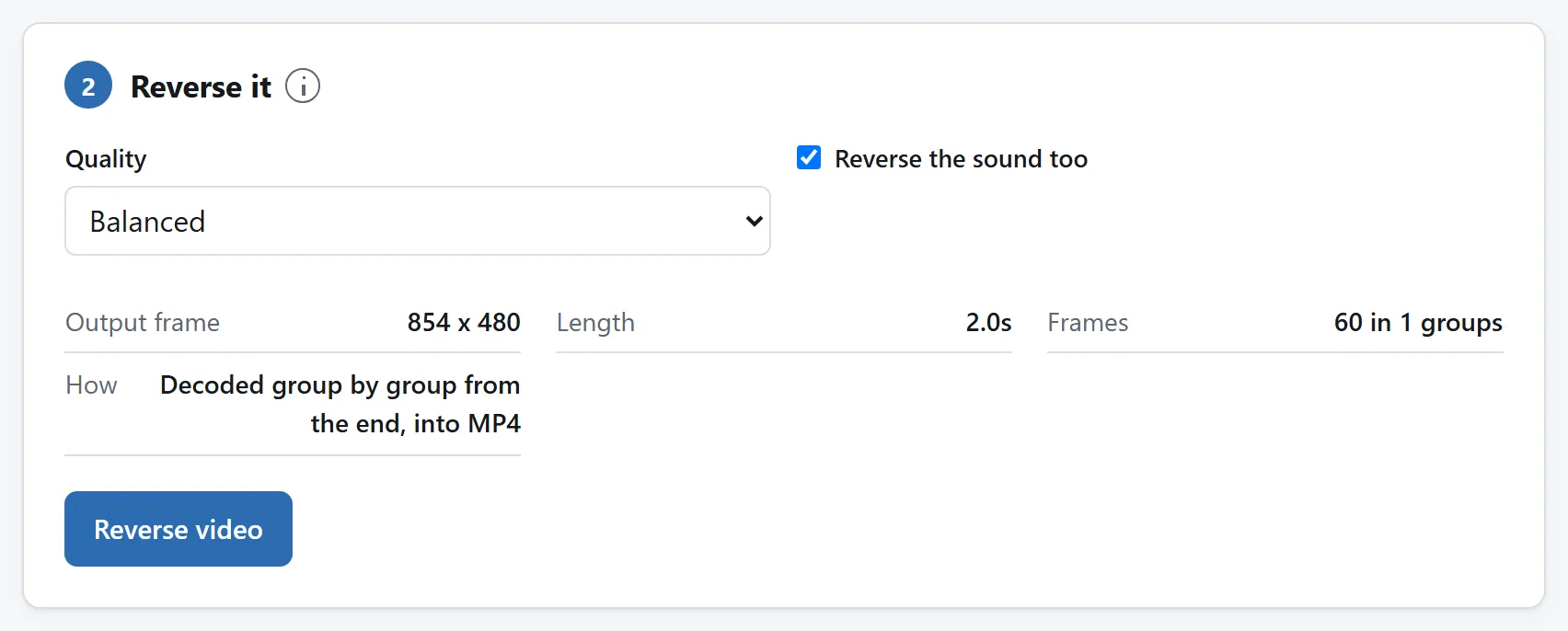
The second half. The sound switch matters more here than anywhere else, for the reason the section above gives.
## Video or GIF at the end
Keep the MP4 if the destination plays video — it is far smaller, far sharper, and loops just as well. Convert to GIF only when the place it is going demands one, and if so, mind the meter: a GIF pays for every frame, and a boomerang is its clip twice over. The [partial-GIF guide](https://abox.tools/guides/make-a-gif-from-part-of-a-video/) covers the width and frame-rate levers that keep it under a size limit.
## If you do this every week
Three pages for one effect is deliberate — each tool does one job, and each page can prove on its own that your footage never leaves the machine. But all three are open source: MIT-licensed, one folder per tool, dependency-free ES modules under `src/` with READMEs that explain them.
If boomerangs are a regular part of your work, point a coding agent at the [repository](https://github.com/A-Box-of-Tools/website) and ask it to fold the reverser's frame walk and the cutter's join into one page with one button. The modules were written to be read, and lifting them is what the licence is for.
The short answer
Cut the moment. Open the Video Cutter, mark the second or two that should swing back and forth, and export it as its own clip.
Reverse a copy. Drop that clip into the Video Reverser, leave the sound out, and export. Now you have the same moment twice, once each way.
Join the two. Back in the Video Cutter, drop both files in, mark each whole, put the forward one first, and export one file.
None of the hops needs a download in between: after every export, a row under the download button offers to carry the result straight into the next tool — the reverser after the first cut, the cutter again after the reversal — and the file arrives there already loaded.
That file is the boomerang. Post it as it is anywhere that loops muted video, or take it through the Video to GIF converter if the destination only animates GIFs. Every step happens in your browser; nothing in this chain is uploaded, at any point, to anyone.
Why cut first
Reversing has to decode and re-encode every frame it touches — the reversing guide explains why there is no cheaper way. Cutting, by contrast, is close to free: the cutter moves whole frames across without re-encoding them.
So the order is the whole trick. Reverse a two-second clip and the expensive step works on two seconds; reverse the original and it works on all of it, most of which you are about to throw away. On a phone recording of any length, cutting first is the difference between a boomerang in under a minute and a progress bar you sit behind.
Cut tight. A boomerang reads best when it swings across a single motion — a jump, a splash, a turn — and every frame you keep is paid for twice, once in each direction.
A second or two is all a boomerang is. Cutting first is what keeps the reverse cheap, and the table is where the length is decided.
What to do with the sound
Leave it out, and do it at the reversing step — the reverser has a checkbox for exactly this. A boomerang's audio would play forwards, then backwards; reversed sound is unmistakably strange, and almost every place a boomerang ends up plays it muted anyway. Dropping the sound also makes the reverse quicker and both files smaller.
If you do keep it, the cutter will still join the two clips — but the seam that the eye forgives, the ear will not.
Joining, and what the cutter will tell you
The two files being joined are close relatives — one was made from the other — but they have been through different encoders, so they may not agree byte-for-byte about their format. The cutter checks. Where the two agree it copies the frames straight across; where they do not it re-encodes, once, and says so on the export panel rather than leaving you to guess.
Order the parts before exporting: forward first, reversed second. A boomerang that starts on the backswing reads as a mistake.
One refinement worth the extra ten seconds: trim one frame off the start of the reversed clip before joining. The last frame of the forward clip and the first frame of the reversed one are the same picture, and showing it twice makes the turn hang for an instant.
The second half. The sound switch matters more here than anywhere else, for the reason the section above gives.
Video or GIF at the end
Keep the MP4 if the destination plays video — it is far smaller, far sharper, and loops just as well. Convert to GIF only when the place it is going demands one, and if so, mind the meter: a GIF pays for every frame, and a boomerang is its clip twice over. The partial-GIF guide covers the width and frame-rate levers that keep it under a size limit.
If you do this every week
Three pages for one effect is deliberate — each tool does one job, and each page can prove on its own that your footage never leaves the machine. But all three are open source: MIT-licensed, one folder per tool, dependency-free ES modules under src/ with READMEs that explain them.
If boomerangs are a regular part of your work, point a coding agent at the repository and ask it to fold the reverser's frame walk and the cutter's join into one page with one button. The modules were written to be read, and lifting them is what the licence is for.

