The short answer
A GIF is a canvas, a list of rectangles to paint onto it, and a colour table saying what the numbers in those rectangles mean. Each rectangle carries three things: how long to leave it up, what to do with it afterwards, and optionally a colour table of its own.
Almost everything people find surprising about the format comes out of that list. If your GIF is enormous, it is because the rectangles are the whole canvas every time, or because there are three hundred colour tables in it. If it plays too slowly, it is because the delays are below a floor no browser will go under. If it smears, it is the field called disposal.
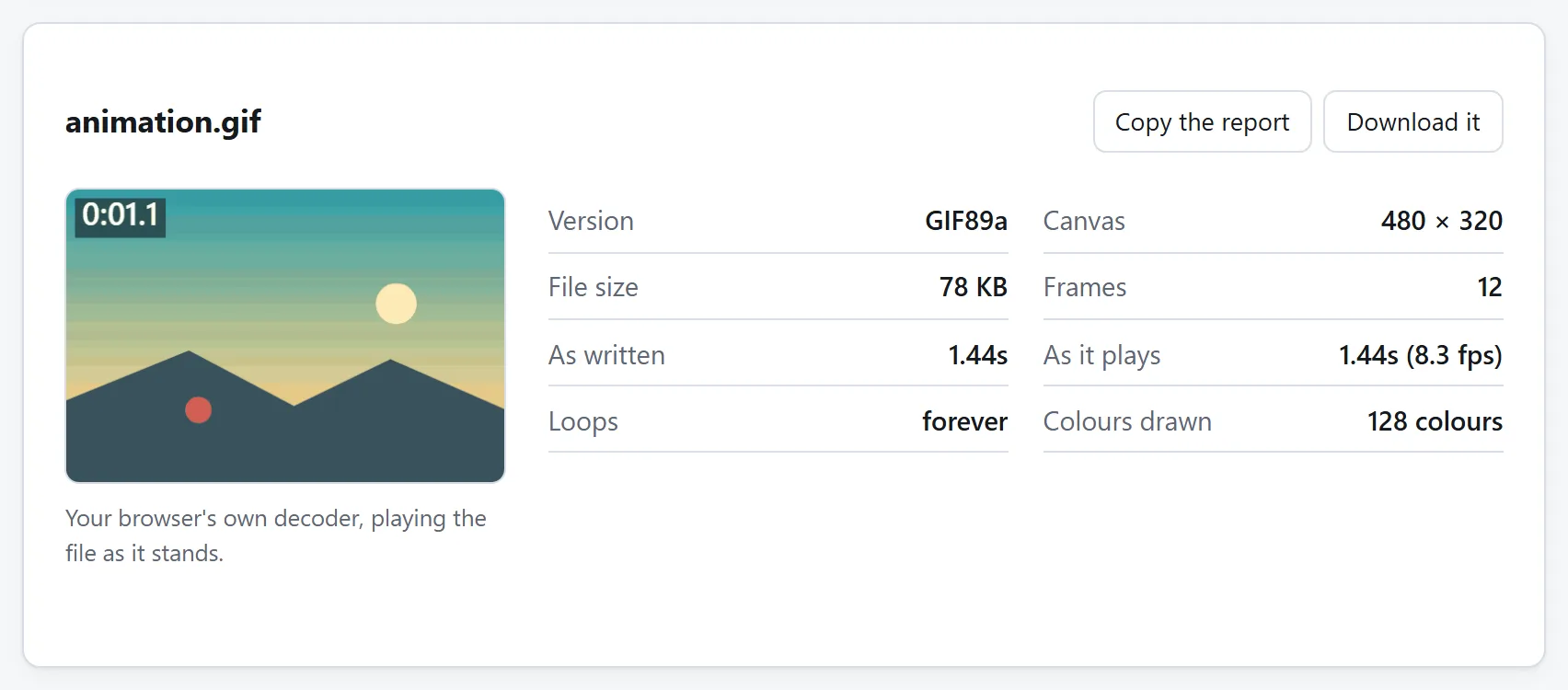
To see which of those it is for a particular file, open the GIF Analyzer and drop it in. The rest of this page is what the numbers mean.
Frames are rectangles, not pictures
This is the part that surprises people who have only ever seen GIFs played. A frame is not a picture of the animation at that moment. It is a rectangle, with a position and a size of its own, painted on top of whatever the previous frames left behind.
That rectangle can be the whole canvas, and in a badly made file it always is. But a GIF is allowed to store only the part of the picture that changed since the last frame — and where most of the picture is standing still, that is the difference between a 12 MB file and a 900 KB one. It is why a screen recording of a mostly-static window can be small, and why the same recording out of a careless converter is not.
You cannot tell which you have by watching the animation. Both look identical. The only way to see it is to look at what each frame stores, which is a view the analyzer has for exactly this reason: switch it to only what each frame stores and you either see a row of small shapes on a transparent background, which means the encoder did its job, or you see the whole picture again and again, which means it did not.
There is no motion compensation anywhere in the format. Nothing is ever stored as “the same as last time but shifted four pixels left”, the way a video codec would. The changed-rectangle trick is the only saving GIF has, and it is worth a great deal.
Delays, and the floor every browser enforces
Each frame stores how long to hold it, in hundredths of a second. That is the only unit the format has, so the fastest a file can ask for is 0.01 seconds — a hundred frames a second — and the longest is about 655 seconds.
It will not get a hundred frames a second. Every browser rounds a delay under 0.02 seconds up to 0.10. The rule was written into Netscape Navigator in 1996, for the spinning globes and animated under-construction signs of the time, and every browser since has copied it. Nothing has ever removed it, and nothing is going to.
So a GIF whose frames all say 0.01s plays at ten frames a second, not a hundred. It runs ten times slower than whatever made it intended, and the file gives no hint of this: the delays in it are exactly what was asked for. This is the single most common surprise in the format, and it is why the analyzer reports two durations — what the file says, and what a browser will actually do with it.
The fix, wherever the file was made, is to write 0.02 rather than 0.01. That gets 50 frames a second, which is the real ceiling, and is faster than anything needs to be. In practice 0.05s — twenty frames a second — is about as quick as it is worth asking for.
One more thing the delays tell you. If they are all identical, the file was made from a set of frames at a fixed rate. If they scatter — 0.04 here, 0.11 there — something converted a video and dropped frames, stretching the neighbours to cover the gaps. And if the last one is much longer than the rest, that is deliberate: it is how you make an animation pause before it loops.
Disposal: the field that decides whether it smears
Each frame says what should be left on screen when its time is up. There are four possible answers and they are worth knowing, because three of the four ways an animation can look wrong are this field being wrong.
- Leave it in place. The next frame paints straight over this one. Correct when frames are opaque and cover each other completely, and the cheapest option, because nothing has to be cleared.
- Clear back to the background. The frame's rectangle is wiped before the next one draws. This is what transparency needs: without it, the see-through parts of the next frame show the previous frame underneath, and an animation of separate pictures turns into a pile of them.
- Restore what was underneath. Whatever was on the canvas before this frame drew is put back. It is how a small object moving over a still background is stored — each frame paints the object, then the background comes back, and only the object's rectangle is ever written.
- Unspecified. The file did not say. Every viewer treats it as “leave it in place”, which is usually right and occasionally the reason a transparent GIF smears.
One detail where the specification and reality part company. “Clear back to the background” names a background colour in the file's header, and every browser ignores it and clears to transparent instead. They have done so for twenty-five years. A file relying on that background colour appearing will look right to whoever made it in whatever made it, and wrong everywhere else.
Colour tables, and the 768 bytes they cost
A GIF pixel is not a colour. It is a number, pointing into a table of at most 256 colours, each stored as three bytes. A full table is therefore 768 bytes, and a file can have one of them shared by everything, or one per frame, or both.
Both arrangements are legitimate and they trade differently:
- One shared table is 768 bytes for the whole file, and it keeps the colours steady between frames. GIF flicker — that unpleasant shimmer on a file made from video — is very often just the palette lurching from frame to frame.
- A table per frame lets each frame use colours the shared one does not have, which matters when the scene changes completely. It costs 768 bytes every time. On a 300-frame animation that is 230 KB of colour tables before a single pixel is stored.
There is a second, quieter cost. A colour table's length has to be a power of two, so a frame using nine colours still gets a table of sixteen and a frame using 130 still gets 256. Some rounding up is unavoidable. A file whose tables declare five thousand colours that its pixels never refer to is something else: palettes built for a picture other than the one that ended up in the frame. The analyzer marks the unused entries so the shape of that is visible at a glance.
Where the bytes actually go
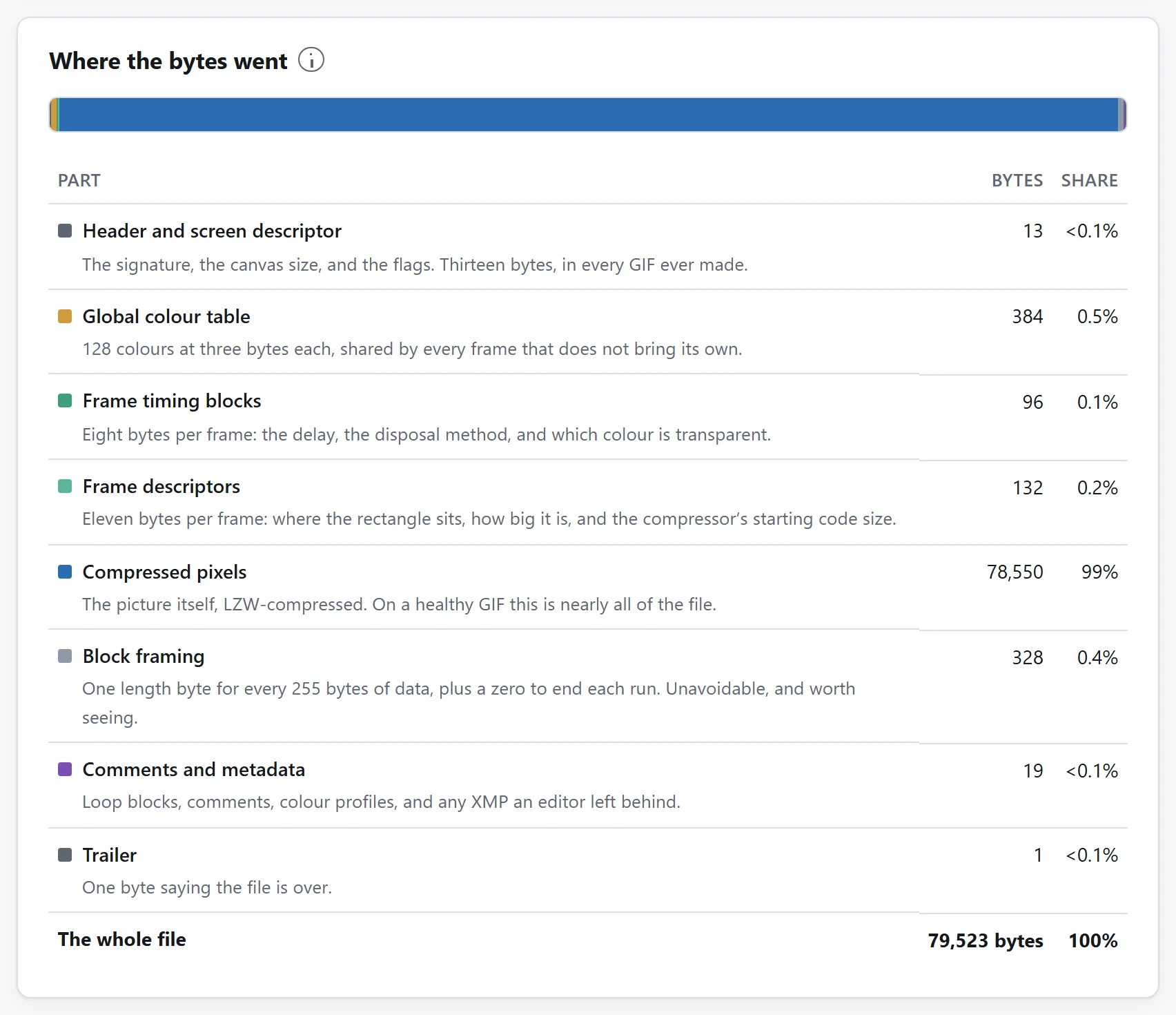
Every byte of a GIF is in one of a small number of places, and it is worth knowing what they are before deciding a file is too big.
- Compressed pixels. On a healthy file, nearly all of it. The picture itself, run through LZW — a compression scheme from 1984 designed for screenshots of spreadsheets, which is why it does well on flat colour and badly on photographs.
- Colour tables. 768 bytes per full table, as above.
- Per-frame headers. Eight bytes of timing and eleven of descriptor for every frame. Nothing on a normal file; on an animation of two thousand tiny frames, 38 KB.
- Block framing. The compressed data is cut into runs of at most 255 bytes, each with a length byte in front. About one byte in every 256, unavoidable, and worth seeing because it is otherwise invisible.
- Metadata. Comments, colour profiles, and XMP packets. This is the one that produces the genuinely absurd results: an image editor can leave 40 KB of XML behind describing an edit made years ago, and on a small GIF that is most of the file. No viewer draws any of it.
The reason to look at this as a table rather than guess is that the answer is different for different files, and the fix follows from the answer. A file that is 95% compressed pixels is simply a lot of picture, and only fewer frames, a smaller size or fewer colours will help. A file that is 30% colour tables or 40% XMP has a much cheaper problem.
Looping is not part of the format
There is no field in the GIF specification that says an animation repeats. Looping comes from a block Netscape invented in 1995 — an “application extension” with the string NETSCAPE2.0 in it — which everything implemented anyway and which is now in every animated GIF on the internet.
Which means a file without that block plays exactly once and stops, in every browser, and looks broken to whoever made it. If an animation is only playing through once, that block is missing; it is one of the first things worth checking and it is invisible in any viewer.
The block can also name a count — play five times and stop. Zero means forever, and is what almost every file says.
The other things a GIF can carry
Three blocks that hold no picture and that every viewer skips:
- Comments. Free text, usually the name of whatever wrote the file, occasionally something the author would not have chosen to publish. Nothing shows it, and every copy of the file carries it.
- XMP. Adobe's XML metadata: what edited the file, when, sometimes who. It arrives with a 258-byte magic trailer on the end, a trick to make the block lengths come out right, which is why reading one naively gets you a screenful of binary.
- Plain text. A block from the 1989 specification that asks the viewer to draw text over the picture in a grid of cells. It was never implemented by anything. If a file has one, whatever it says will not appear.
All three are worth knowing about before sending a file somewhere: they are the parts of a GIF that can say something about you, and they survive every copy and re-upload unless something deliberately strips them.
Reading a damaged file
GIFs get truncated — a download that stopped, a file recovered off a failing disk, something an app wrote half of. Because the format is a stream of blocks rather than one indexed structure, a truncated GIF is usually still readable up to the point it stops: every frame before the break is intact and complete.
That is worth knowing because most software will simply refuse the file. An analyzer that reads as far as it can and says where it stopped will at least tell you how much survived, and whether the missing part is one frame or the last two hundred.
The opposite problem also exists: bytes sitting after the file's end marker. Every decoder stops at that marker, so they are never read and never drawn, and they are usually a second file appended to the first by something that went wrong. They are pure weight and cutting them off loses nothing.
None of this needs an upload
Reading a GIF's structure is not a demanding job — it is a walk through a list of blocks and one small decompressor — and there has never been a technical reason to send the file to a server to do it. The GIF Analyzer here does the whole thing in the page: the block walk, the LZW, the frames drawn on screen and the byte accounting.
That matters more for this job than for most, because the files people most want to take apart are often the ones they are least sure about sharing — something recovered, something someone sent them, something with a comment block in it they have not read yet. The longer argument about uploading files applies here as strongly as anywhere on this site.