Convert one document locally, then check the values before using the result. YAML comments disappear in JSON, and this reader deliberately refuses unsupported YAML constructs.
Open the YAML to JSON ConverterBoth directions, and it says what each one costs. Nothing is pasted into anyone else's server.
# How to convert between YAML and JSON
Convert one document locally, then check the values before using the result. YAML comments disappear in JSON, and this reader deliberately refuses unsupported YAML constructs.
[Open the YAML to JSON Converter](https://abox.tools/yaml-to-json/): Both directions, and it says what each one costs. Nothing is pasted into anyone else's server.
Last updated 12 October 2026
## Choose the direction and add the text
Paste a document or choose a file. The menu selects YAML to JSON or JSON to YAML; importing a `.json`, `.yaml` or `.yml` file selects the matching direction. Review the result before Copy or Download.
The conversion runs in your browser without uploading the configuration. Keep an original copy: formatting and comment changes can matter to the person who maintains it even when the data is unchanged.
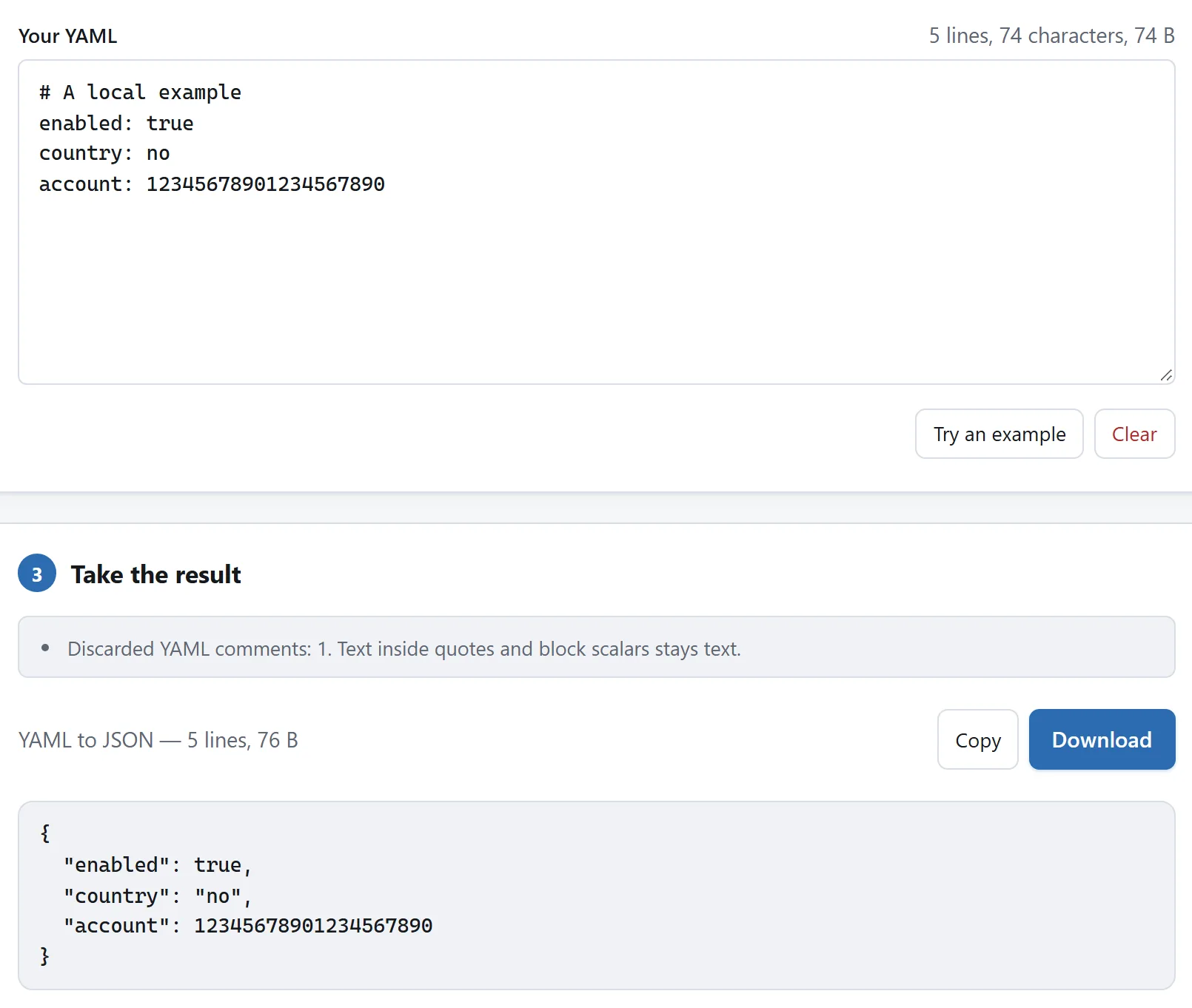
The comment disappears, while no remains a string and the large integer keeps its digits.
## Use the supported YAML subset
The reader handles common mappings, sequences and scalar values with YAML 1.2-style resolution. It is not a complete YAML 1.2 implementation. Anchors, aliases, custom tags and multiple-document streams stop conversion. Use a parser supporting those features when the file needs them; removing an alias without preserving its meaning changes the configuration.
A parse error offers Go to error. Correct the reported input instead of using the previous output, which becomes unavailable when you edit.
## Check comments, strings and numbers
```
enabled: true
country: no
account: 12345678901234567890
```
Here `no` stays the string `"no"`, rather than becoming false as it can in YAML 1.1. The converter retains number text without rounding that large account number through JavaScript floating point. The application reading the result may still impose its own numeric limits.
JSON has no comments, so YAML comments are discarded and the tool reports the comments it consumed. A `#` inside a quoted string or block scalar is content, not a comment.
## Converting JSON back to YAML
The data model carries across, but the result is newly written YAML, not a recovery of earlier comments or formatting. Ambiguous words are quoted for readers that still use YAML 1.1. Check the receiving application’s YAML version and schema, especially for deployment configuration.
The [YAML specification](https://yaml.org/spec/1.2.2/) describes the full language. For checking or minifying JSON alone, use the [JSON formatter](https://abox.tools/json-formatter/).
Choose the direction and add the text
Paste a document or choose a file. The menu selects YAML to JSON or JSON to YAML; importing a .json, .yaml or .yml file selects the matching direction. Review the result before Copy or Download.
The conversion runs in your browser without uploading the configuration. Keep an original copy: formatting and comment changes can matter to the person who maintains it even when the data is unchanged.
The comment disappears, while no remains a string and the large integer keeps its digits.
Use the supported YAML subset
The reader handles common mappings, sequences and scalar values with YAML 1.2-style resolution. It is not a complete YAML 1.2 implementation. Anchors, aliases, custom tags and multiple-document streams stop conversion. Use a parser supporting those features when the file needs them; removing an alias without preserving its meaning changes the configuration.
A parse error offers Go to error. Correct the reported input instead of using the previous output, which becomes unavailable when you edit.
Check comments, strings and numbers
enabled: true
country: no
account: 12345678901234567890
Here no stays the string "no", rather than becoming false as it can in YAML 1.1. The converter retains number text without rounding that large account number through JavaScript floating point. The application reading the result may still impose its own numeric limits.
JSON has no comments, so YAML comments are discarded and the tool reports the comments it consumed. A # inside a quoted string or block scalar is content, not a comment.
Converting JSON back to YAML
The data model carries across, but the result is newly written YAML, not a recovery of earlier comments or formatting. Ambiguous words are quoted for readers that still use YAML 1.1. Check the receiving application’s YAML version and schema, especially for deployment configuration.
