The line of hex under a download link is there so you can prove the file arrived intact. Comparing it takes about a minute. Knowing what the comparison is worth — and the one habit that makes it worth nothing — takes the rest of this page.
Open the Hash & ChecksumCheck a download against the number the publisher printed, without sending it to anyone.
# How to check a download against its checksum
The line of hex under a download link is there so you can prove the file arrived intact. Comparing it takes about a minute. Knowing what the comparison is worth — and the one habit that makes it worth nothing — takes the rest of this page.
[Open the Hash & Checksum](https://abox.tools/hash-checksum/): Check a download against the number the publisher printed, without sending it to anyone.
Last updated 26 August 2026
## The short answer
Open [Hash & Checksum](https://abox.tools/hash-checksum/), drop the file you downloaded onto it, and paste the checksum from the download page into the box at the bottom. The page works out which algorithm the number is from how long it is, and answers in a sentence.
If it matches, the bytes on your disk are the bytes the publisher measured. If it does not, download the file again before you open it. Everything below is what that sentence leaves out.
## What the number under the download link is
It is the output of a hash function: a calculation that reads every byte of a file and produces a short, fixed-length answer. The same file always gives the same answer, and a file that differs by a single bit gives a completely different one — not a nearly-identical one, an unrelated one. That is the whole property being relied on.
Because the answer is short and the file is not, the calculation throws information away, and there are necessarily many files that share any given answer. Finding one of them on purpose is the hard part, and how hard it is is what separates the algorithms below from each other.
Nothing about a checksum is secret and nothing about it is reversible. It is a fingerprint, published so that two people can agree they are holding the same thing.
## Which algorithm you are looking at
You do not have to choose — the publisher already did, and your job is to compute the same one. You can tell which from the length alone:
- **32 hex characters** — MD5.
- **40** — SHA-1.
- **64** — SHA-256, and this is what you will see most.
- **96** — SHA-384.
- **128** — SHA-512.
No two of them are the same length, which is why the tool can identify a pasted value without being told. A string that is 63 characters long is not a checksum of anything; it is a SHA-256 that lost a character on the way to your clipboard.
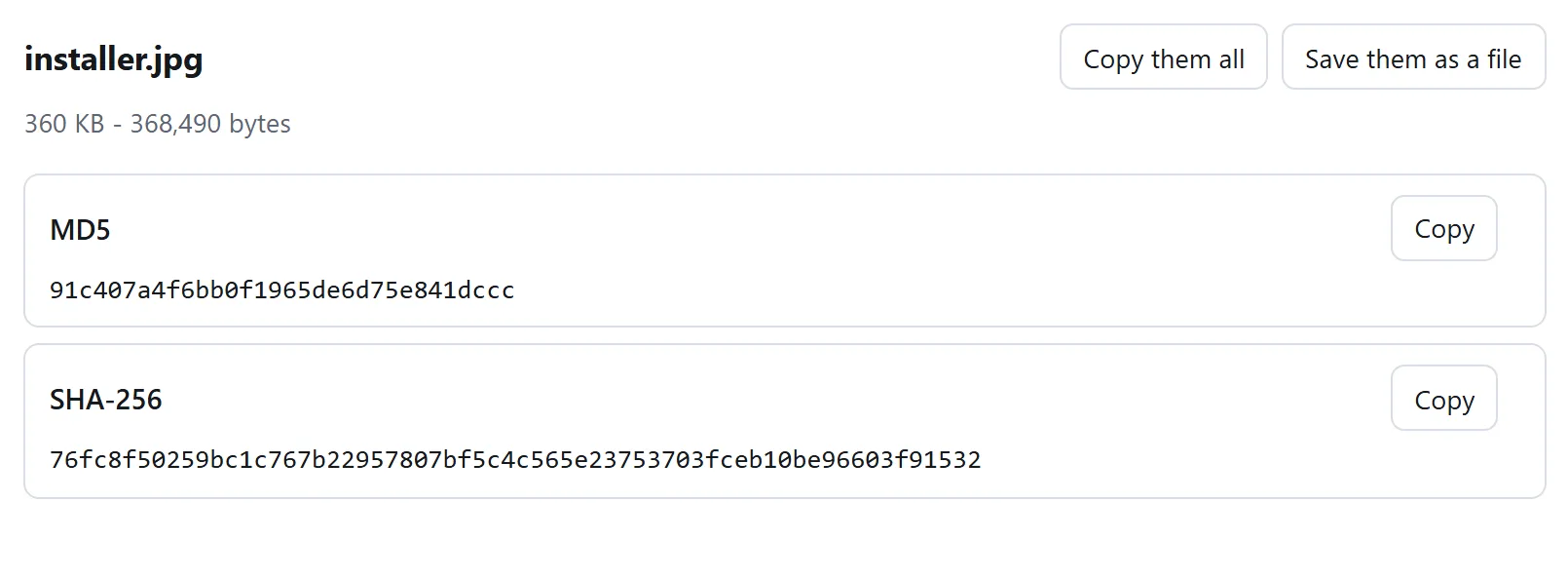
All of them at once, because which one to use is decided by whoever published the file rather than by you.
## Doing it on your own machine, without a browser
Every operating system ships something that does this, and it is worth knowing the command even if you use a page for it — there is no better answer to "how do I know your site computed it honestly" than running the same file through the tool that came with your computer.
**Windows**, in PowerShell:
```
Get-FileHash .\disk.iso -Algorithm SHA256
```
Older machines have `certutil -hashfile disk.iso SHA256` instead, which prints in upper case with spaces in it. Case never matters in a checksum comparison; the letters are digits, not words.
**macOS**:
```
shasum -a 256 disk.iso
```
**Linux**:
```
sha256sum disk.iso
```
All three print the same string for the same file, and so does this site. They are exact specifications with published test vectors; there is no room for an implementation to have an opinion.
## Comparing them without going cross-eyed
Do not read sixty-four characters off two screens and decide they look the same. People check the first four and the last four and stop, which is exactly the comparison an attacker would arrange to pass, and it is also how an honest mistake gets waved through.
Paste both into something that can compare them for you. On a command line that is what the `-c` flag is for:
```
sha256sum -c SHA256SUMS
```
In a browser it is the comparison box on [Hash & Checksum](https://abox.tools/hash-checksum/), which takes the value in whatever shape the publisher wrote it — bare hex, a line of `sha256sum` output, a whole `SHA256SUMS` file, the `SHA256 (disk.iso) = …` form, or an `integrity="sha384-…"` attribute out of a script tag — and says yes or no in a sentence.
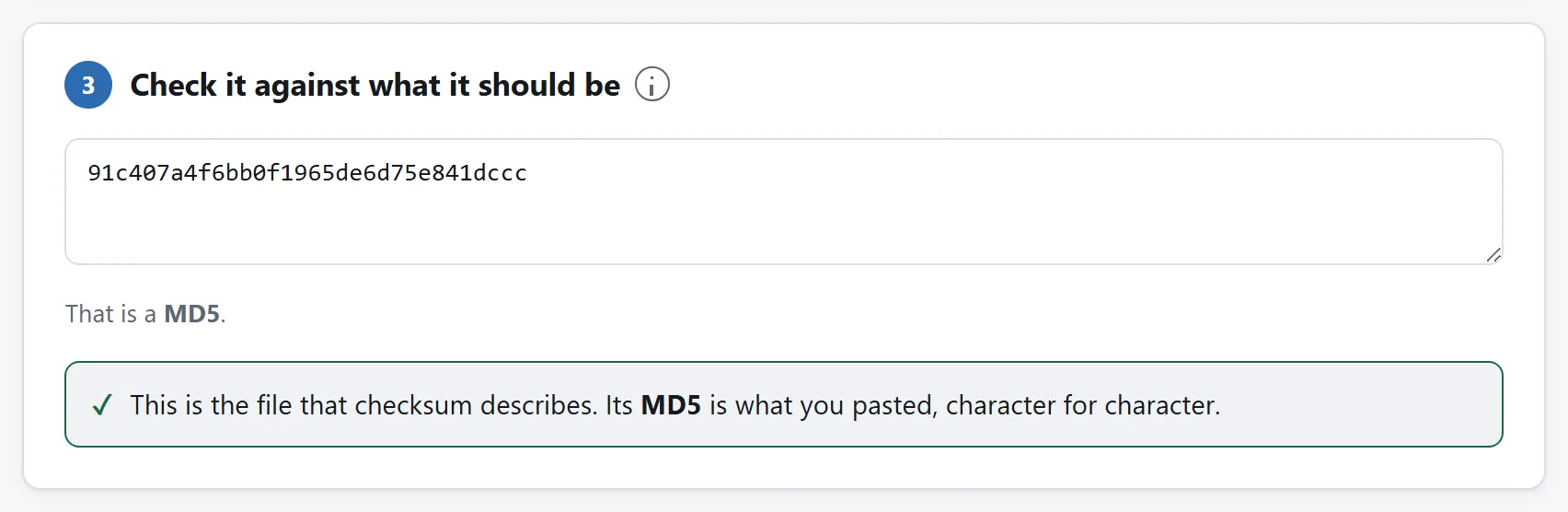
Paste what the download page said and let the tool do the comparing. Reading sixty-four characters off a screen is the step this exists to remove.
## What a match proves, exactly
That the bytes on your disk are the bytes somebody had in front of them when they wrote that number down. That is a genuinely useful thing to know and it is narrower than most people assume, so it is worth listing what it covers and what it does not.
**A match rules out:**
- a download that stopped early and left you a file that looks complete;
- corruption in transit, on a failing disk, or in a bad USB cable;
- the wrong file — the ARM build instead of the x86 one, or last month's release;
- a mirror that quietly serves something other than what it advertises.
**A match does not rule out:**
- **the file being malicious.** A publisher can measure malware exactly as accurately as anything else. A checksum says "this is what they shipped", never "this is safe";
- **the publisher having been compromised.** If someone replaced the file on the server, they replaced the checksum beside it in the same minute. Which brings us to the next section.
## The mistake that makes the whole exercise pointless
Taking the checksum from the same page, over the same connection, as the file.
Think about what you are defending against. If the worry is a corrupted download, the checksum can come from anywhere and the check works. If the worry is somebody tampering with the file, then whoever could change the file could change the line of hex printed underneath it, because both came from the same server over the same connection. You would be asking the forger to confirm the signature.
A checksum is worth most when it reaches you by a route the file did not:
- a `SHA256SUMS` file with a detached GPG signature, checked against a key you already had — this is what distributions publish and it is the real answer;
- the release announcement on a mailing list, or a tag in a source repository, rather than the download page;
- a second mirror on a different domain, and the two compared with each other;
- a package manager, which is doing this for you against keys shipped with the operating system.
None of that makes checking a same-page checksum useless. It catches the broken download, which is the failure that actually happens to people. Just do not tell yourself it caught anything else.
## MD5 and SHA-1 are broken. Use them anyway, sometimes
Both have been broken in the strongest sense that matters here: *collisions* can be constructed on purpose. Two different files with the same MD5 have been buildable on ordinary hardware since 2004, and in 2017 a team produced two different PDFs with the same SHA-1. In 2020 the chosen-prefix version of that attack came down to a few tens of thousands of dollars of rented computing.
What that means in practice: a matching MD5 no longer tells you nobody meddled with the file, because somebody who wanted to could have built a different file with the same number. It still tells you the download was not truncated or corrupted, because a random accident will not land on a collision — that has odds no accident has ever had.
So if the publisher printed an MD5 and nothing else, check it. It is worth more than not checking. And if you are the one publishing, print a SHA-256.
## It did not match. What now?
1. **Download it again**, from the same place. An interrupted or resumed transfer is far and away the most common cause and a second copy usually settles it.
2. **Check you are on the right line.** Release pages list several files; the checksum for the installer will never match the archive, and the ARM build will never match the x86 one.
3. **Check the version.** Bookmarked checksum pages go stale the day a point release ships.
4. **Try a different mirror** and compare the two files' checksums with each other. Two mirrors agreeing with each other and disagreeing with the published number is a different problem from one mirror disagreeing with both.
5. **Do not open it in the meantime.** A file that fails its checksum is at best damaged and at worst not the file you asked for.
## Why do this in a browser at all
Because the command line is not where most people are, and because the obvious alternative — a website that asks you to upload the file — is a strange thing to do with an installer you are already unsure about. Sending a file somewhere to find out whether it was tampered with in transit adds one more place it can be tampered with.
[Hash & Checksum](https://abox.tools/hash-checksum/) reads the file in four-megabyte pieces on your own machine, so there is no upload, no size limit, and nothing to trust beyond the page itself — which you can read, and which keeps working with the network unplugged. If you would rather trust your own operating system, run the command from the section above and compare the two answers. They will agree.
The short answer
Open Hash & Checksum, drop the file you downloaded onto it, and paste the checksum from the download page into the box at the bottom. The page works out which algorithm the number is from how long it is, and answers in a sentence.
If it matches, the bytes on your disk are the bytes the publisher measured. If it does not, download the file again before you open it. Everything below is what that sentence leaves out.
What the number under the download link is
It is the output of a hash function: a calculation that reads every byte of a file and produces a short, fixed-length answer. The same file always gives the same answer, and a file that differs by a single bit gives a completely different one — not a nearly-identical one, an unrelated one. That is the whole property being relied on.
Because the answer is short and the file is not, the calculation throws information away, and there are necessarily many files that share any given answer. Finding one of them on purpose is the hard part, and how hard it is is what separates the algorithms below from each other.
Nothing about a checksum is secret and nothing about it is reversible. It is a fingerprint, published so that two people can agree they are holding the same thing.
Which algorithm you are looking at
You do not have to choose — the publisher already did, and your job is to compute the same one. You can tell which from the length alone:
32 hex characters — MD5.
40 — SHA-1.
64 — SHA-256, and this is what you will see most.
96 — SHA-384.
128 — SHA-512.
No two of them are the same length, which is why the tool can identify a pasted value without being told. A string that is 63 characters long is not a checksum of anything; it is a SHA-256 that lost a character on the way to your clipboard.
All of them at once, because which one to use is decided by whoever published the file rather than by you.
Doing it on your own machine, without a browser
Every operating system ships something that does this, and it is worth knowing the command even if you use a page for it — there is no better answer to "how do I know your site computed it honestly" than running the same file through the tool that came with your computer.
Windows, in PowerShell:
Get-FileHash .\disk.iso -Algorithm SHA256
Older machines have certutil -hashfile disk.iso SHA256 instead, which prints in upper case with spaces in it. Case never matters in a checksum comparison; the letters are digits, not words.
macOS:
shasum -a 256 disk.iso
Linux:
sha256sum disk.iso
All three print the same string for the same file, and so does this site. They are exact specifications with published test vectors; there is no room for an implementation to have an opinion.
Comparing them without going cross-eyed
Do not read sixty-four characters off two screens and decide they look the same. People check the first four and the last four and stop, which is exactly the comparison an attacker would arrange to pass, and it is also how an honest mistake gets waved through.
Paste both into something that can compare them for you. On a command line that is what the -c flag is for:
sha256sum -c SHA256SUMS
In a browser it is the comparison box on Hash & Checksum, which takes the value in whatever shape the publisher wrote it — bare hex, a line of sha256sum output, a whole SHA256SUMS file, the SHA256 (disk.iso) = … form, or an integrity="sha384-…" attribute out of a script tag — and says yes or no in a sentence.
Paste what the download page said and let the tool do the comparing. Reading sixty-four characters off a screen is the step this exists to remove.
What a match proves, exactly
That the bytes on your disk are the bytes somebody had in front of them when they wrote that number down. That is a genuinely useful thing to know and it is narrower than most people assume, so it is worth listing what it covers and what it does not.
A match rules out:
a download that stopped early and left you a file that looks complete;
corruption in transit, on a failing disk, or in a bad USB cable;
the wrong file — the ARM build instead of the x86 one, or last month's release;
a mirror that quietly serves something other than what it advertises.
A match does not rule out:
the file being malicious. A publisher can measure malware exactly as accurately as anything else. A checksum says "this is what they shipped", never "this is safe";
the publisher having been compromised. If someone replaced the file on the server, they replaced the checksum beside it in the same minute. Which brings us to the next section.
The mistake that makes the whole exercise pointless
Taking the checksum from the same page, over the same connection, as the file.
Think about what you are defending against. If the worry is a corrupted download, the checksum can come from anywhere and the check works. If the worry is somebody tampering with the file, then whoever could change the file could change the line of hex printed underneath it, because both came from the same server over the same connection. You would be asking the forger to confirm the signature.
A checksum is worth most when it reaches you by a route the file did not:
a SHA256SUMS file with a detached GPG signature, checked against a key you already had — this is what distributions publish and it is the real answer;
the release announcement on a mailing list, or a tag in a source repository, rather than the download page;
a second mirror on a different domain, and the two compared with each other;
a package manager, which is doing this for you against keys shipped with the operating system.
None of that makes checking a same-page checksum useless. It catches the broken download, which is the failure that actually happens to people. Just do not tell yourself it caught anything else.
MD5 and SHA-1 are broken. Use them anyway, sometimes
Both have been broken in the strongest sense that matters here: collisions can be constructed on purpose. Two different files with the same MD5 have been buildable on ordinary hardware since 2004, and in 2017 a team produced two different PDFs with the same SHA-1. In 2020 the chosen-prefix version of that attack came down to a few tens of thousands of dollars of rented computing.
What that means in practice: a matching MD5 no longer tells you nobody meddled with the file, because somebody who wanted to could have built a different file with the same number. It still tells you the download was not truncated or corrupted, because a random accident will not land on a collision — that has odds no accident has ever had.
So if the publisher printed an MD5 and nothing else, check it. It is worth more than not checking. And if you are the one publishing, print a SHA-256.
It did not match. What now?
Download it again, from the same place. An interrupted or resumed transfer is far and away the most common cause and a second copy usually settles it.
Check you are on the right line. Release pages list several files; the checksum for the installer will never match the archive, and the ARM build will never match the x86 one.
Check the version. Bookmarked checksum pages go stale the day a point release ships.
Try a different mirror and compare the two files' checksums with each other. Two mirrors agreeing with each other and disagreeing with the published number is a different problem from one mirror disagreeing with both.
Do not open it in the meantime. A file that fails its checksum is at best damaged and at worst not the file you asked for.
Why do this in a browser at all
Because the command line is not where most people are, and because the obvious alternative — a website that asks you to upload the file — is a strange thing to do with an installer you are already unsure about. Sending a file somewhere to find out whether it was tampered with in transit adds one more place it can be tampered with.
Hash & Checksum reads the file in four-megabyte pieces on your own machine, so there is no upload, no size limit, and nothing to trust beyond the page itself — which you can read, and which keeps working with the network unplugged. If you would rather trust your own operating system, run the command from the section above and compare the two answers. They will agree.

