How to share text and files between devices without uploading them
The usual ways to move a note or a file to another machine all leave a copy behind: in a sent folder, a chat history, or on a sharing site's server behind a delete button you have to trust. There is a way to move it that leaves nothing anywhere, because nothing is ever stored - and it is also the only way that works with a name you can say across a room.
Open the Share Text & FilesThe share lives in this open tab. Readers fetch it directly from your browser, encrypted, and closing the tab ends it - nothing is stored on any server.
# How to share text and files between devices without uploading them
The usual ways to move a note or a file to another machine all leave a copy behind: in a sent folder, a chat history, or on a sharing site's server behind a delete button you have to trust. There is a way to move it that leaves nothing anywhere, because nothing is ever stored - and it is also the only way that works with a name you can say across a room.
[Open the Share Text & Files](https://abox.tools/share-text/): The share lives in this open tab. Readers fetch it directly from your browser, encrypted, and closing the tab ends it - nothing is stored on any server.
Last updated 5 October 2026
## The short answer
Open [Share Text & Files](https://abox.tools/share-text/) on the machine that has the thing, write or attach it, and press *Start sharing*. The page gives the share a name like `brave-otter-42`; on the other device, open the same page and put `#brave-otter-42` on the end of the address — or just follow the copied link. The other device asks before connecting, you let it in, and the text or file crosses directly from one browser to the other, encrypted. Close the sharing tab and the share is over, everywhere.
No shared text or file was uploaded to a server. That is the shape of the thing. The rest of this page is why that matters, and what the honest limits of it are.
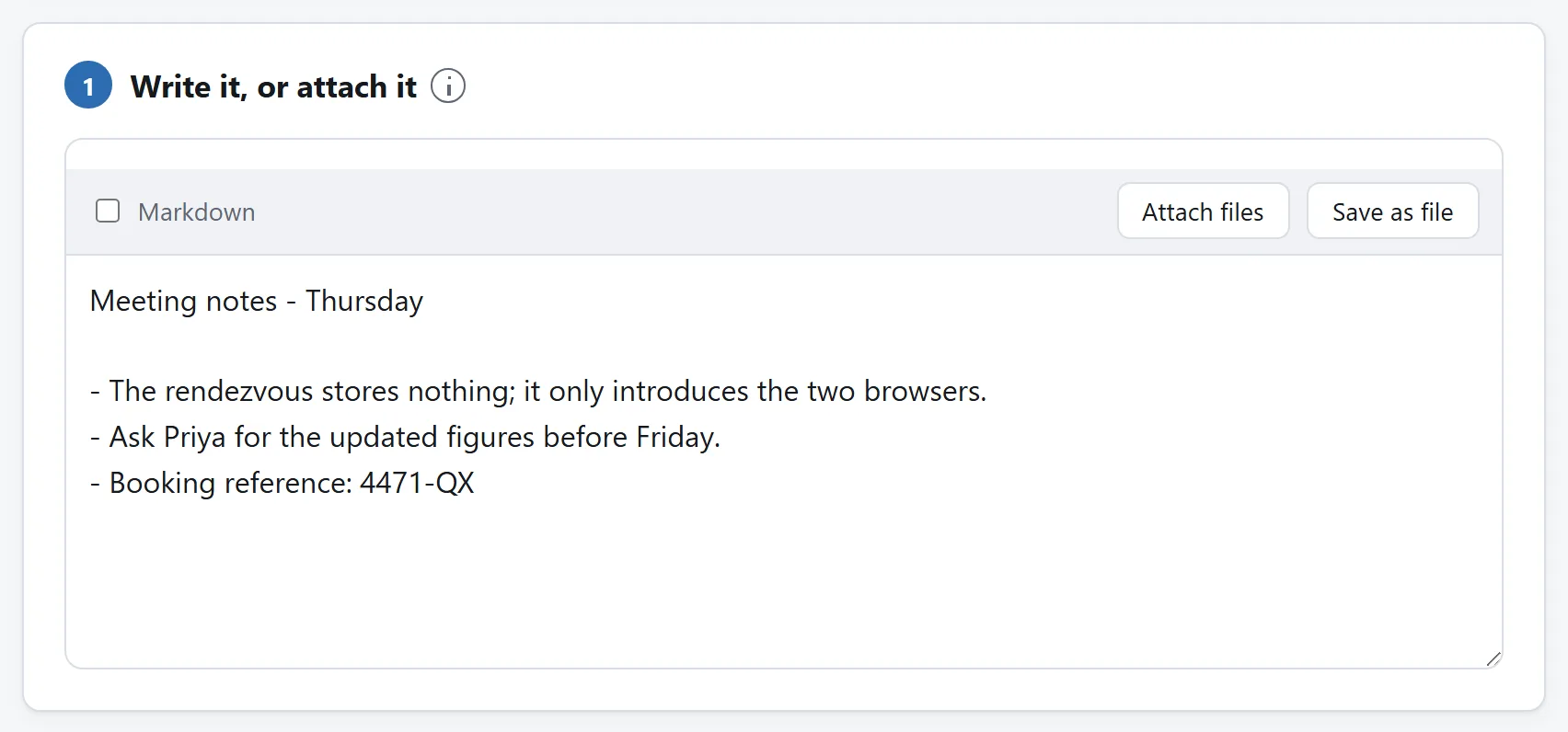
What is being handed over. The same box takes a shopping list or a document, and Markdown is a switch rather than a separate mode.
## Where the usual ways leave a copy
Email yourself a note and it now exists in a sent folder and an inbox, both synced, both backed up, both searchable years from now. Paste a password into a chat app and it sits in that conversation's history — and in the app's cloud backup — for as long as the conversation exists. Use a pastebin or a file-drop site and the content sits on their server behind an expiry setting and a delete button, and the only part of that arrangement you can verify is the button's colour. Every one of these is a storage service wearing sharing as a feature.
Sometimes that is exactly what you want — a copy that waits until the other person is ready. But most quick shares are the opposite: the other device is right there, the content is momentary, and every stored copy is pure liability. The Wi-Fi password for a guest, an address read over the phone, an error message that needs a second pair of eyes, a config snippet moving to the machine it belongs on. None of these wants an archive.
## What “direct” actually means
The tool uses WebRTC, the same machinery as browser video calls: two browsers open an encrypted channel to each other and send data through it without a server in the path. Two devices with a working local connection can transfer at the speed of that network; the route also depends on VPNs, browser policies and the devices' network settings.
One honest asterisk, stated on the tool page too: two browsers cannot find each other unaided. A small server — the rendezvous — matches the person who typed the name with the person sharing under it and carries a few kilobytes of connection set-up between them. It keeps no shared content, and the content never passes through it; its whole source is published beside the tool's. It is the introduction, not the conversation. It also lists opted-in local link names, which is how a second browser can find a share on the tool's start page. It is the one server anything on this site talks to, which is why the tool's own page spells out exactly what it can and cannot see.
Direct also means mutual: each browser learns the other's network address, as with a phone call. The reading side is told this before any connection exists and connects only by choosing to.
## Sharing on the same Wi-Fi or Ethernet
Local network is off by default. Before starting the share, choose *Local network — no internet relay*. Attach the file, leave Private on if you want to approve each reader, and start sharing. Discoverable is checked by default: open the tool page on the second device and choose the share's name from *Local shares on this connection*. It opens the consent page, then asks for your approval on a private share. Uncheck Discoverable before starting if you want to share only by link. Both devices need to use the same Wi-Fi or Ethernet. Files still have the same 200 MB limit, and readers still choose which ones to download.
The list groups browsers by the public IPv4 address or IPv6 subnet the introduction server sees. Usually that means one router, but a shared VPN or an ISP sharing one address can include other networks. Mixed IPv4 and IPv6 connections or different routes can hide a device sitting beside you. Keep Private on on shared networks; a listed name is visible to others in that group, and the list does not prove that a device is in the same room or building. Internet is required. If discovery is unavailable, the copied link still works.
The copied link carries the setting as `?local=1#brave-otter-42`. If you say the name aloud, include the Local network setting too: `#brave-otter-42` alone asks for the ordinary connection mode. If the reader uses a different mode from the sharer, the page explains it and asks them to choose before trying with the sharer's mode.
Local mode uses no public address-discovery server and never offers an internet relay. Internet access is still needed for the rendezvous that introduces the browsers. Guest Wi-Fi may isolate devices from each other; firewalls, VPNs and browser network policies can also stop the connection or change the route. This mode controls how browsers find a direct path, and does not prove that the path stays inside a physical building.
## The name is the address; Private decides who gets in
A share link differs from every other sharing link in one practical way: it survives being spoken. `brave-otter-42` can be said across a room, read down a phone, or written on a whiteboard, and typed on the other end without anybody's thumbs giving out. That is the whole reason the names look the way they do.
It cuts both ways: anyone who knows or guesses a live name can open the share behind it. A discoverable local share lists that name for browsers using the same public IPv4 address or IPv6 subnet, so the name is public within that group. For anything sensitive, keep the default — shares are *private* unless you untick the box, which means every arriving reader has to introduce themselves and you decide, message by message, who gets in. The introduction travels the encrypted direct channel, so not even the rendezvous learns who asked.
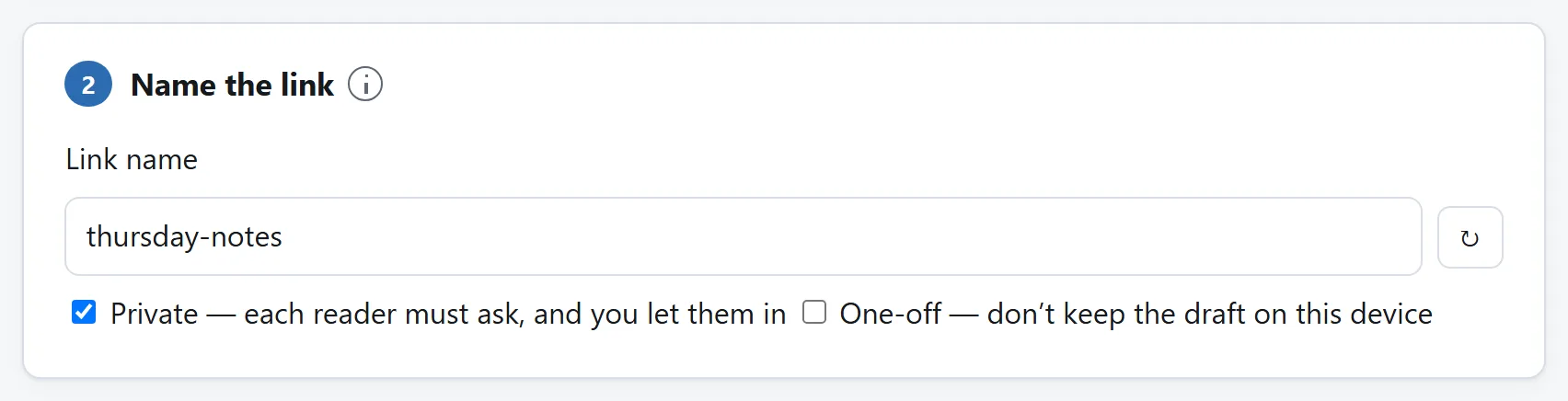
The name is the whole of the address. Private means each reader has to ask and you let them in; one-off means the draft is not kept on this device either.
## What closing the tab actually ends
The share lives in the sharing tab and nowhere else, so closing that tab is the deletion — not a request for one. The link dies within a couple of seconds, and readers still looking at the share see their page clear. There is no server copy with its own lifecycle, no trash folder, no thirty-day retention. The draft you typed stays in your own browser so it is there next time, and even that can be switched off with the one-off setting.
What it does not end is possession. A reader who copied the text or downloaded the file while the share was open has it, exactly as if you had handed it over any other way. No tool can unsend, and a tool that claimed to would be lying to you about somebody else's computer. Ending the share governs the future — nobody new, nothing more — and that is the part a stored-copy service cannot give you.
## An online interview is the ideal case
A hand-off tool wants both ends present, and an interview is the one appointment where presence is guaranteed: you are already looking at each other. It is also where the stored-copy ways cost the most. Whatever crosses the meeting chat lands in the platform's transcript, attached to the recording and to whoever is sent it afterwards; and opening an inbox or a chat app to fetch a link while your screen is shared puts your correspondence on someone else's recording. The sharing page shows the shared thing and nothing else.
In practice: the portfolio link, the repository, the take-home PDF, the code snippet that would not survive the chat box's smart quotes — start the share before the call, and when the moment comes, say the name out loud. `brave-otter-42` crosses a voice call intact, which is exactly what the names were shaped for, and the other side has the file before the sentence is finished. Left private, the share also makes the interviewer's arrival something you approve mid-call rather than a door standing open; and when the call ends, closing the tab ends the share with it — nothing waits in a transcript to be re-read out of context later.
One honest preparation: interviewers sit on strict corporate networks more often than most readers, and that is where the rare pair with no direct path lives. Their network cannot be tested from home — but the tool announces the failure within twenty seconds rather than hanging, so the fallback costs you moments, not the interview.
## When this is the wrong tool
Both ends have to be present: this is a hand-off, not a mailbox. If the other person is asleep, use something that stores — knowingly. The sharing tab has to stay open and awake, which in practice means a desktop or laptop does the sharing; phones suspend background tabs in seconds, though they read a share perfectly well. It cannot work offline, alone on this site, because reaching another machine is a network act — although the editor half works with no connection at all. And a small minority of network pairs — typically one end on a mobile carrier's shared-address network or a strict corporate one — cannot be joined directly at all; the tool says so plainly after twenty seconds, and in ordinary mode offers the reader an encrypted relay that forwards the bytes without being able to read them, rather than switching to one quietly. Local network mode offers no relay and asks you to check the shared network and its connection settings.
For everything else — the note, the password, the config file, the 100 MB video that is one Wi-Fi hop away — the direct version is faster, simpler, and leaves the world exactly as it found it.
The short answer
Open Share Text & Files on the machine that has the thing, write or attach it, and press Start sharing. The page gives the share a name like brave-otter-42; on the other device, open the same page and put #brave-otter-42 on the end of the address — or just follow the copied link. The other device asks before connecting, you let it in, and the text or file crosses directly from one browser to the other, encrypted. Close the sharing tab and the share is over, everywhere.
No shared text or file was uploaded to a server. That is the shape of the thing. The rest of this page is why that matters, and what the honest limits of it are.
What is being handed over. The same box takes a shopping list or a document, and Markdown is a switch rather than a separate mode.
Where the usual ways leave a copy
Email yourself a note and it now exists in a sent folder and an inbox, both synced, both backed up, both searchable years from now. Paste a password into a chat app and it sits in that conversation's history — and in the app's cloud backup — for as long as the conversation exists. Use a pastebin or a file-drop site and the content sits on their server behind an expiry setting and a delete button, and the only part of that arrangement you can verify is the button's colour. Every one of these is a storage service wearing sharing as a feature.
Sometimes that is exactly what you want — a copy that waits until the other person is ready. But most quick shares are the opposite: the other device is right there, the content is momentary, and every stored copy is pure liability. The Wi-Fi password for a guest, an address read over the phone, an error message that needs a second pair of eyes, a config snippet moving to the machine it belongs on. None of these wants an archive.
What “direct” actually means
The tool uses WebRTC, the same machinery as browser video calls: two browsers open an encrypted channel to each other and send data through it without a server in the path. Two devices with a working local connection can transfer at the speed of that network; the route also depends on VPNs, browser policies and the devices' network settings.
One honest asterisk, stated on the tool page too: two browsers cannot find each other unaided. A small server — the rendezvous — matches the person who typed the name with the person sharing under it and carries a few kilobytes of connection set-up between them. It keeps no shared content, and the content never passes through it; its whole source is published beside the tool's. It is the introduction, not the conversation. It also lists opted-in local link names, which is how a second browser can find a share on the tool's start page. It is the one server anything on this site talks to, which is why the tool's own page spells out exactly what it can and cannot see.
Direct also means mutual: each browser learns the other's network address, as with a phone call. The reading side is told this before any connection exists and connects only by choosing to.
Sharing on the same Wi-Fi or Ethernet
Local network is off by default. Before starting the share, choose Local network — no internet relay. Attach the file, leave Private on if you want to approve each reader, and start sharing. Discoverable is checked by default: open the tool page on the second device and choose the share's name from Local shares on this connection. It opens the consent page, then asks for your approval on a private share. Uncheck Discoverable before starting if you want to share only by link. Both devices need to use the same Wi-Fi or Ethernet. Files still have the same 200 MB limit, and readers still choose which ones to download.
The list groups browsers by the public IPv4 address or IPv6 subnet the introduction server sees. Usually that means one router, but a shared VPN or an ISP sharing one address can include other networks. Mixed IPv4 and IPv6 connections or different routes can hide a device sitting beside you. Keep Private on on shared networks; a listed name is visible to others in that group, and the list does not prove that a device is in the same room or building. Internet is required. If discovery is unavailable, the copied link still works.
The copied link carries the setting as ?local=1#brave-otter-42. If you say the name aloud, include the Local network setting too: #brave-otter-42 alone asks for the ordinary connection mode. If the reader uses a different mode from the sharer, the page explains it and asks them to choose before trying with the sharer's mode.
Local mode uses no public address-discovery server and never offers an internet relay. Internet access is still needed for the rendezvous that introduces the browsers. Guest Wi-Fi may isolate devices from each other; firewalls, VPNs and browser network policies can also stop the connection or change the route. This mode controls how browsers find a direct path, and does not prove that the path stays inside a physical building.
The name is the address; Private decides who gets in
A share link differs from every other sharing link in one practical way: it survives being spoken. brave-otter-42 can be said across a room, read down a phone, or written on a whiteboard, and typed on the other end without anybody's thumbs giving out. That is the whole reason the names look the way they do.
It cuts both ways: anyone who knows or guesses a live name can open the share behind it. A discoverable local share lists that name for browsers using the same public IPv4 address or IPv6 subnet, so the name is public within that group. For anything sensitive, keep the default — shares are private unless you untick the box, which means every arriving reader has to introduce themselves and you decide, message by message, who gets in. The introduction travels the encrypted direct channel, so not even the rendezvous learns who asked.
The name is the whole of the address. Private means each reader has to ask and you let them in; one-off means the draft is not kept on this device either.
What closing the tab actually ends
The share lives in the sharing tab and nowhere else, so closing that tab is the deletion — not a request for one. The link dies within a couple of seconds, and readers still looking at the share see their page clear. There is no server copy with its own lifecycle, no trash folder, no thirty-day retention. The draft you typed stays in your own browser so it is there next time, and even that can be switched off with the one-off setting.
What it does not end is possession. A reader who copied the text or downloaded the file while the share was open has it, exactly as if you had handed it over any other way. No tool can unsend, and a tool that claimed to would be lying to you about somebody else's computer. Ending the share governs the future — nobody new, nothing more — and that is the part a stored-copy service cannot give you.
An online interview is the ideal case
A hand-off tool wants both ends present, and an interview is the one appointment where presence is guaranteed: you are already looking at each other. It is also where the stored-copy ways cost the most. Whatever crosses the meeting chat lands in the platform's transcript, attached to the recording and to whoever is sent it afterwards; and opening an inbox or a chat app to fetch a link while your screen is shared puts your correspondence on someone else's recording. The sharing page shows the shared thing and nothing else.
In practice: the portfolio link, the repository, the take-home PDF, the code snippet that would not survive the chat box's smart quotes — start the share before the call, and when the moment comes, say the name out loud. brave-otter-42 crosses a voice call intact, which is exactly what the names were shaped for, and the other side has the file before the sentence is finished. Left private, the share also makes the interviewer's arrival something you approve mid-call rather than a door standing open; and when the call ends, closing the tab ends the share with it — nothing waits in a transcript to be re-read out of context later.
One honest preparation: interviewers sit on strict corporate networks more often than most readers, and that is where the rare pair with no direct path lives. Their network cannot be tested from home — but the tool announces the failure within twenty seconds rather than hanging, so the fallback costs you moments, not the interview.
When this is the wrong tool
Both ends have to be present: this is a hand-off, not a mailbox. If the other person is asleep, use something that stores — knowingly. The sharing tab has to stay open and awake, which in practice means a desktop or laptop does the sharing; phones suspend background tabs in seconds, though they read a share perfectly well. It cannot work offline, alone on this site, because reaching another machine is a network act — although the editor half works with no connection at all. And a small minority of network pairs — typically one end on a mobile carrier's shared-address network or a strict corporate one — cannot be joined directly at all; the tool says so plainly after twenty seconds, and in ordinary mode offers the reader an encrypted relay that forwards the bytes without being able to read them, rather than switching to one quietly. Local network mode offers no relay and asks you to check the shared network and its connection settings.
For everything else — the note, the password, the config file, the 100 MB video that is one Wi-Fi hop away — the direct version is faster, simpler, and leaves the world exactly as it found it.

